This article was written by Jack Lloyd. Jack Lloyd is a Technology Writer and Editor for wikiHow. He has over two years of experience writing and editing technology-related articles. He is technology enthusiast and an English teacher.
The wikiHow Tech Team also followed the article's instructions and verified that they work.
This article has been viewed 2,366,882 times.
This wikiHow teaches you how to change the folder (also known as the "directory") in which your Windows computer's Command Prompt program operates. To make changes in Command Prompt, you must be using an administrator account.
Steps
Part 1
Part 1 of 2:Opening Command Prompt
-
1Open Start. Either click the Windows logo in the bottom-left corner of the screen, or press the ⊞ Win key.
- For Windows 8, place your mouse cursor in the top-right corner of the screen, then click the magnifying glass icon when it appears.
-
2Type in cmd. This will bring up the Command Prompt icon at the top of the Start window.
-
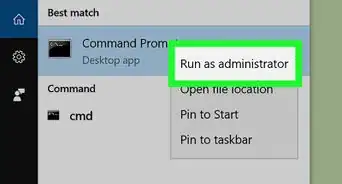
3Right-click Command Prompt. It resembles a black box. This invokes a drop-down menu.
-
4Click Run as administrator. It's near the top of the drop-down menu. Doing so will open Command Prompt with administrator privileges.
- Confirm this choice by clicking Yes when prompted.
- You won't be able to run Command Prompt in administrator mode if you're on a restricted, public, or networked computer (e.g., a library or school computer), or an otherwise non-administrator account.


Part 2
Part 2 of 2:Changing the Directory
-
1Type in cd . Make sure you include the space after "cd". This command, which stands for "change directory", is the root of any directory change.
- Don't press the ↵ Enter key.
-
2Determine your directory's path. A directory path is like a map to a specific folder. For example, if the directory to which you want to change is the "System32" folder that's in the "WINDOWS" folder on the hard drive, the path would be "C:\WINDOWS\System32\".
- You can find a folder's path by opening My Computer, double-clicking the hard drive icon, navigating to your destination, and then looking at the address at the top of the folder.
-
3Type in your directory's path. Your command or address goes after the "cd" command; make sure there is a space between "cd" and your command.
- For example, your whole command might look like cd Windows\System32 or cd D:.
- Since your computer's default directory location will be the hard drive (e.g., "C:"), you don't need to type in the hard drive's name.
-
4Press ↵ Enter. Doing so will change the Command Prompt directory to your selected one.


Community Q&A
-
QuestionHow do I go to C:\ from C:\users\username?
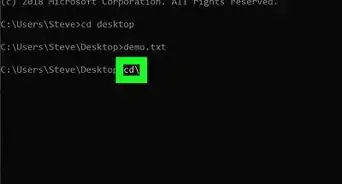
 Community AnswerYou can either type "cd .." to take you up a directory level (to C:\users) and once again to take you to the root level, or you can always type "cd \" from any directory to take you to the root level.
 -
QuestionHow do I change the name of a drive, like from Drive H: to drive A:?Community AnswerIn start, type Computer Management. Open Computer Management and click the arrow next to Storage, then Disk Management. Right-click the drive you want to rename and click Change Drive Letter.
-
QuestionWhat is the difference between cd\ and cd?
 Community AnswerIn order to use cd you have to put a file path after it; cd\ just goes straight to C:\.
 -
QuestionHow do I make a new directory?Community AnswerTo make a new directory in the current directory simply type "mkdir dirname" (without the quotation marks).
-
QuestionHow do I open a desktop folder if the given cmd is not working?
 Community AnswerI had this problem before, try "dir" and then write the exact folder name that appeared.
 -
QuestionHow do I create a folder on the desktop?
 Community AnswerLeft click on any open space on the desktop, then click "New folder." The folder will be created and you will be prompted to name it.
 -
QuestionWhat would you type at a command prompt to change to the root directory of the c: drive if the prompt says c:\winnt\system32?Community AnswerThe command you are looking for is: cd/.
-
QuestionCan you change the directory without having administrator privileges? If so, how?
 Sasa BozilovicCommunity AnswerFollow the steps in this article, but log on using a non admin account. Make sure you can't use admin actions, such as "del system path\system file".
 -
QuestionHow do I list directories in the folder I'm in?Sasa BozilovicCommunity AnswerTo list directories in the folder you're in, simply type "dir". It will display everything in this folder, including files. To list directories in the specific folder, type "dir path to folder\folder". For example, to list directories in a folder called "lol" in a user folder called "tik", type "dir C:\Users\tik\lol".
-
QuestionHow can I get my date in CMD?Sasa BozilovicCommunity AnswerType "echo %date%". It will display date info. To change your date, simply type "date", type mm/dd/yyyy (m resembles month, d resembles date, y resembles year) and hit enter.
Warnings
- Attempting to run a command that is contingent on a specific file or folder while in a different directory will result in errors.Thanks!

-Files-in-Command-Prompt-Step-6.webp)
About This Article
1. Open Command Prompt.
2. Type in cd followed by a space.
3. Type in your preferred directory command or path.
4. Press ↵ Enter.