This article was co-authored by wikiHow Staff. Our trained team of editors and researchers validate articles for accuracy and comprehensiveness. wikiHow's Content Management Team carefully monitors the work from our editorial staff to ensure that each article is backed by trusted research and meets our high quality standards.
The wikiHow Tech Team also followed the article's instructions and verified that they work.
This article has been viewed 604,877 times.
Learn more...
This wikiHow teaches you how to watch an animated version of Star Wars rendered entirely in ASCII characters (by folks with a lot of free time) using the telnet command on your computer. As of 2021, the server hosting the ASCII version of Star Wars isn't online as much as it used to be, but don't worry—if you're really wanting to watch the ASCII-animated version of Star Wars, you can always view the java version on the original creator's website!
Steps
Method 1
Method 1 of 2:Windows
-
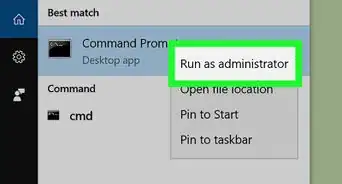
1Open the Command Prompt. The easiest way to do this is to press Windows key + S to activate the search bar, type cmd, and then click Command Prompt in the search results.
- If you're not already connected to the internet, make sure you do so before you continue.
-
2Check to see if telnet is installed. Telnet is a tool used to make connections to remote servers. Because telnet isn't as widely used as it used to be (and more secure options exist), it no longer comes preinstalled on most Windows systems. To find out if you already have telnet:
- Type telnet at the command prompt and press Enter.
- If you see "Welcome to Microsoft Telnet Client" and a prompt that begins with Microsoft Telnet, you already have telnet. For now, just type a q and press Enter to quit telnet and return to the prompt.
- If you see an error that says "'telnet' is not recognized as an internal or external command, operable program or batch file," you must install telnet.
Advertisement -
3Install telnet if it's not installed. If you already have telnet, skip to the next step. If not, here's how you can easily install it:
- Right-click the Windows Start menu and select Apps and Features.[1]
- Click Optional features in the right panel (under "Apps & features").
- Scroll down and click More Windows features at the bottom.
- Check the box next to "Telnet Client" and click OK.
- Close and re-open the Command Prompt.
-
4Type telnet at the prompt and press ↵ Enter. This opens the telnet interface.
-
5Type o and press ↵ Enter. "O" stands for "open," and this command tells telnet to open a connection. The command line will change to ( to ).
-
6Type towel.blinkenlights.nl and press ↵ Enter. This connects you to the server that hosts the Star Wars animation. After rolling some credits, the movie will begin!
- To stop the animation and exit telnet, press Ctrl + ].
- If the server hosting the Star Wars animation is down, you will receive an error when trying to connect. Sadly, the server is not up as often as it used to be. If you see an error that says "Could not open connection to the host, on port 23: Connect failed," the server is not currently accepting connections. You can still watch the movie in your web browser at http://www.asciimation.co.nz/index.php.
Advertisement


Method 2
Method 2 of 2:Mac
-
1Open Terminal on your Mac. An easy way to do this is to click the Launchpad icon on the dock (it's a rocketship icon on some versions of macOS, and multicolored squares on more recent versions), type terminal, and then click the Terminal icon.[2]
- You can also open Terminal in Finder—just open the Applications folder, double-click the Utilities folder, and then double-click Terminal.
-
2Install Homebrew. As of macOS Mojave, telnet is no longer installed by default. To install it quickly and easily, you can use Homebrew. Here's how:
- If you're not already connected to the internet, make sure you do so before you continue.
- Type this at the prompt: /bin/bash -c "$(curl -fsSL https://raw.githubusercontent.com/Homebrew/install/HEAD/install.sh)".[3]
- Press Return.
- Follow the on-screen instructions to install Homebrew.
-
3Type brew install telnet and press ⏎ Return. This installs telnet on your Mac.
-
4Type telnet and press ⏎ Return. This opens telnet.
-
5Type o and press ⏎ Return. This is the command to open a Telnet connection (the "o" stands for "open").
-
6Type towel.blinkenlights.nl and press ⏎ Return. This opens a connection to the host that hosts the Star Wars animation. After some opening credits, the movie will begin to play.
- To stop the animation and exit telnet, press Ctrl + C.
- Sadly, the Star Wars animation server is down a lot more often than it used to be. If you see an error that says "Could not open connection to the host, on port 23: Connect failed," the server is not currently accepting connections. You can still watch the movie in your web browser at http://www.asciimation.co.nz/index.php.
Advertisement


Community Q&A
-
QuestionHow can I terminate this command?
 Community AnswerYou can terminate any command in the Command Prompt by pressing ctrl-C. You can also just click on the small red X button in the top right corner of the Command Prompt window.
 -
QuestionDo I need to connect to the internet?
 Community AnswerYes. When you are watching Star Wars in the command prompt, you are using Telnet (also known as "remote desktop connection") to connect to whoever made this computer through the internet.
 -
QuestionI turned on Telnet, but it didn't install anything on the latest version of Windows. What could be wrong?Community AnswerIt might have been installed already. Try to watch Star Wars in command prompt with the settings set to on.
-
QuestionIt accepts the command, but then a few moments later, it says connection lost. What's going on?Community AnswerBe sure to use port 23. For example: "Telnet Towel.blinkenlights.nl port=23".
-
QuestionDoes this prompt work on Version 10.0 of CMD?
 Community AnswerYes, but it is in a very small format in the top left corner of the CMD window.
 -
QuestionWhat happens if it does not work?Community AnswerBe sure that you have written: towel.blinkenlightS.nl and not towel.blinkenlight.nl as it is erroneously shown in the image.
-
QuestionIs there any way to make this work without the admin information?Community AnswerNo. You need to have the administrator's password or access details, as you will be installing new software on your computer (Telnet).
-
QuestionDoes it need a fast Internet connection?Community AnswerYou need a steady, responsive internet connection. Fast may not be required, as this requires only ASCII bytes and not MBs of data, as in for a video.
-
QuestionWhat do I do if my Windows 10 is not showing the IP address?Community AnswerYour IP address is not specifically needed in this case.
-
QuestionWhen I type in "telnet towel.blinkenlights.nl" as a command through the telnet interface, it says that it "cannot connect to host." Is this an error on my part?Community AnswerYou need to run it as administrator. (right-click on cmd> run as administrator).
-Files-in-Command-Prompt-Step-6.webp)
About This Article

1. Install telnet if it's not installed.
2. Open the command prompt.
3. Type telnet towel.blinkenlights.nl and press Enter.