X
This article was written by Nicole Levine, MFA. Nicole Levine is a Technology Writer and Editor for wikiHow. She has more than 20 years of experience creating technical documentation and leading support teams at major web hosting and software companies. Nicole also holds an MFA in Creative Writing from Portland State University and teaches composition, fiction-writing, and zine-making at various institutions.
This article has been viewed 10,098 times.
This wikiHow teaches you how to set up your iPhone or iPad to encrypt outgoing email in the Gmail app. You’ll need to have the recipient’s S/MIME certificate or public key installed for encryption to work.
Steps
-
1
-
2Scroll down and tap Accounts & Passwords.
-
3Tap Gmail. It’s under the “ACCOUNTS” heading.
-
4Tap your account. It’s under the “GMAIL” header at the top of the screen.
-
5Tap Advanced. It’s at the bottom of the screen.
-
6
-
7Tap Sign. It’s below the switch you just turned on.
-
8
-
9Tap the back button until you’ve returned to the Advanced menu.
-
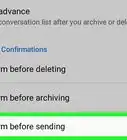
10Tap Encrypt by Default. It’s below the “S/MIME” header.
-
11




About This Article

Nicole Levine, MFA
Tech Specialist
This article was written by Nicole Levine, MFA. Nicole Levine is a Technology Writer and Editor for wikiHow. She has more than 20 years of experience creating technical documentation and leading support teams at major web hosting and software companies. Nicole also holds an MFA in Creative Writing from Portland State University and teaches composition, fiction-writing, and zine-making at various institutions. This article has been viewed 10,098 times.
How helpful is this?
Co-authors: 1
Updated: May 8, 2018
Views: 10,098
Categories: Gmail