X
wikiHow is a “wiki,” similar to Wikipedia, which means that many of our articles are co-written by multiple authors. To create this article, volunteer authors worked to edit and improve it over time.
This article has been viewed 13,150 times.
Learn more...
The most popular attachment types are the Quick Time Player, Windows Media Player, MS PowerPoint and MS Word. Obviously to be able to open an attachment with a certain program it should be installed on your computer prior to using it.
This wiki article will show a few examples of opening the Thunderbird attachments using some programs.
Steps
Method 1
Method 1 of 3:Open an attachment with Quick Time Player (3GPP file)
Method 1
-
1Click on an attachment to open it.
- It will take you to a prompt window looking like on image
-
2Keep a default option "Open with ..." and using a little arrow on the right side place "Quick Time Player" into the window (if it's not in there yet)
- Tick a box "Do this automatically for files like these ..."
- Click "OK" button
-
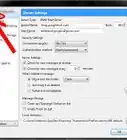
3Click on Tools (on toolbar), then Options, and Attachments tab
- Make sure your action is added to the Settings (shown by arrow)
-
4Click the "OK" button to save it.


Method 2
Method 2 of 3:Open an attachment with MS PowerPoint (PPS, PPT files)
Method 2
-
1Click on the attachment to open it.
-
2Repeat the process described in step 2 (in method 1) but this time make sure to place "Microsoft PowerPoint" into the window.
-
3Click on the Tools, Options, and Attachments tab.
- Make sure your action is added to the Settings (shown by arrow on image)
- Make sure your action is added to the Settings (shown by arrow on image)
-
4Click the "OK" button.


Method 3
Method 3 of 3:Open an attachment with Microsoft Word (DOC file)
Method 3