X
wikiHow is a “wiki,” similar to Wikipedia, which means that many of our articles are co-written by multiple authors. To create this article, volunteer authors worked to edit and improve it over time.
The wikiHow Tech Team also followed the article's instructions and verified that they work.
This article has been viewed 9,165 times.
Learn more...
Steps
-
1Log in to Twitter. Go to twitter.com in your web browser and sign in with your username/email and password.
-
2Navigate to your profile page. Click on your profile icon on the top-right side of the page and select Profile from the drop-down menu.
-
3Move to the Moments tab. Click on the Moments, right after the Lists or Likes.
-
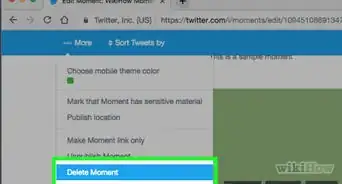
4Click on the V button, which you can see the right corner of your moment. Click on Delete Moment from the options.
-
5Confirm your action. Click on the Delete button from the confirmation pop-up message.
-
6Finished. When you delete your Moment, it will be permanently removed from Twitter and no longer appear on your profile page. Done!