X
wikiHow is a “wiki,” similar to Wikipedia, which means that many of our articles are co-written by multiple authors. To create this article, volunteer authors worked to edit and improve it over time.
This article has been viewed 78,685 times.
Learn more...
If you block someone Twitter, their profile will be added to a list under your blocked account settings. To see the list, follow the instructions on this wikiHow. This will not work on the mobile site.
- Before you start: Ensure you've logged in to Twitter.
Steps
Method 1
Method 1 of 3:Desktop Site
Method 1


Method 2
Method 2 of 3:iOS and Android Apps
Method 2


Method 3
Method 3 of 3:Windows Store App
Method 3
-
1Click or tap the profile icon from the top/side depending on the size of the app window. If the navigation options are located to the left, there might be a label next to the icon that reads as "Me".
-
2Click or tap the square Settings button on your profile.
-
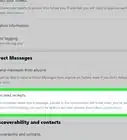
3Go to Blocked accounts. It's located towards the bottom.


Things You'll Need
- Electronic device
- Twitter account