X
This article was co-authored by wikiHow Staff. Our trained team of editors and researchers validate articles for accuracy and comprehensiveness. wikiHow's Content Management Team carefully monitors the work from our editorial staff to ensure that each article is backed by trusted research and meets our high quality standards.
This article has been viewed 4,542 times.
Learn more...
This wikiHow teaches you how to edit your home address and change its saved location on Google Maps, using a desktop internet browser.
Steps
-
1Open Google Maps in an internet browser. Type maps.google.com into your browser's address bar, and hit ↵ Enter or ⏎ Return on your keyboard.
-
2Sign in to your Google account. Click the blue Sign in button on the top-right, and log in with your email or username, and your password.Advertisement
-
3Click the search bar. The search bar is labeled "Search Google Maps" in the upper-left corner of the window. It will let you search any location on the map.
-
4Type Home in the search bar. The search bar will list all the saved home addresses on a drop-down list.
- If you haven't set a home address before, you can add a new one by clicking SET LOCATION on the drop-down list.
-
5Click the EDIT button. This button is located next to your saved home address in the upper-right corner of the drop-down list. It will allow you to edit the saved address.
-
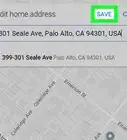
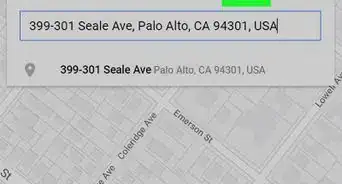
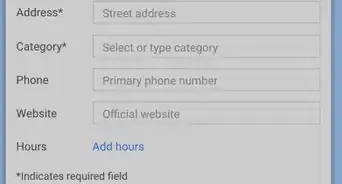
6Enter a new address into the text field. Type your new address into the text field to change your home.
-
7Click the SAVE button. It's located next to CANCEL in the upper-right corner of the search bar. This will save your new home address on your Google account.Advertisement


About This Article

wikiHow Staff
wikiHow Staff Writer
This article was co-authored by wikiHow Staff. Our trained team of editors and researchers validate articles for accuracy and comprehensiveness. wikiHow's Content Management Team carefully monitors the work from our editorial staff to ensure that each article is backed by trusted research and meets our high quality standards. This article has been viewed 4,542 times.
How helpful is this?
Co-authors: 2
Updated: August 24, 2021
Views: 4,542
Categories: Google Maps
Article SummaryX
1. Open Google Maps in a browser.
2. Sign into your account.
3. Click the search bar.
4. Type "Home."
5. Click EDIT.
6. Enter your new address.
7. Click SAVE.
Did this summary help you?
Advertisement