This article was co-authored by Luigi Oppido. Luigi Oppido is the Owner and Operator of Pleasure Point Computers in Santa Cruz, California. Luigi has over 25 years of experience in general computer repair, data recovery, virus removal, and upgrades. He is also the host of the Computer Man Show! broadcasted on KSQD covering central California for over two years.
The wikiHow Tech Team also followed the article's instructions and verified that they work.
This article has been viewed 607,323 times.
This wikiHow teaches you how to change your password using the Facebook mobile app or website. If you've forgotten your Facebook password, you'll need to reset it.
Steps
Method 1
Method 1 of 2:On the Mobile App
-
1Open the Facebook app. It's a blue app with a white f.
- Log in if you're not signed in automatically.
-
2Tap ☰. It's in the lower-right on iPhone or upper-right on Android.Advertisement
-
3Scroll down and tap Account Settings.
- On iPhone, tap Settings first.
-
4Tap Security and Login.
-
5Tap Change password. It's under the "LOGIN" section.
-
6Enter your current password in the top field.
-
7Type a new password in the next field.
-
8Re-type the new password in the bottom field.
-
9Tap Save Changes. Your Facebook password has been changed.Advertisement


Method 2
Method 2 of 2:On Desktop
-
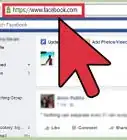
1Go to http://www.facebook.com in a Web browser.
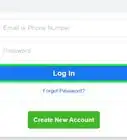
- Log in if you're not signed in automatically.
-
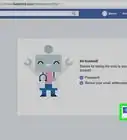
2
-
3Click Settings. It's at the bottom of the menu.
-
4Click Security and Login. It's in the upper-left part of the window.
-
5Scroll down and click Change password.
-
6Enter your current password in the top field.
-
7Type a new password in the next field.
-
8Re-type the new password in the bottom field.
-
9Click Save Changes. Your Facebook password has been changed.Advertisement


Community Q&A
Did you know you can get expert answers for this article?
Unlock expert answers by supporting wikiHow
-
QuestionWhat's a good password if I don't want to get hacked?
 Luigi OppidoLuigi Oppido is the Owner and Operator of Pleasure Point Computers in Santa Cruz, California. Luigi has over 25 years of experience in general computer repair, data recovery, virus removal, and upgrades. He is also the host of the Computer Man Show! broadcasted on KSQD covering central California for over two years.
Computer & Tech SpecialistA lot of sites require the 1 number, 1 uppercase letter, 1 lowercase letter, and a special character, but that can be kind of difficult to remember. If you have a choice, I'm a fan of using a phrase, like "fuzzywuzzybear" or something like that. The longer it is, the better.
Support wikiHow by unlocking this expert answer.
-
QuestionHow do you make a password hard to guess?Luigi OppidoLuigi Oppido is the Owner and Operator of Pleasure Point Computers in Santa Cruz, California. Luigi has over 25 years of experience in general computer repair, data recovery, virus removal, and upgrades. He is also the host of the Computer Man Show! broadcasted on KSQD covering central California for over two years.
Computer & Tech SpecialistYou'd think it would involve a bunch of symbols and numbers or something, but it's just the length really. The longer your password is, the harder it will be for some random person to guess. Computer algorithms can actually guess a shorter, complicated password fairly quickly. A longer password may take hundreds of years for a program to guess.Support wikiHow by unlocking this expert answer.
-
QuestionWhat is two-factor authentication? Should I turn it on?Luigi OppidoLuigi Oppido is the Owner and Operator of Pleasure Point Computers in Santa Cruz, California. Luigi has over 25 years of experience in general computer repair, data recovery, virus removal, and upgrades. He is also the host of the Computer Man Show! broadcasted on KSQD covering central California for over two years.
Computer & Tech SpecialistYes, you should turn it on. Two-factor authentication is basically insurance for your password. When you log on, you'll get a text message or be required to open an app on your phone to confirm the login. It's one of the best ways to keep your personal information private.Support wikiHow by unlocking this expert answer.
-
QuestionHow do you totally delete your Facebook account?
 Community AnswerAlthough Facebook doesn't like people completely deleting their accounts, you can close your account so no profile data exists. If you'd like to do so, you can follow this guide instead: How to Permanently Delete a Facebook Account. If you just want to deactivate your account so it is no longer visible, but available should you want to get it back, follow these steps: How to Deactivate a Facebook Account.
 -
QuestionAfter changing my new password, how would I save it?
 Community AnswerIf you are talking about a button to save your new password, follow the steps above, as they describe the button you'll need to click. However, if you are wondering where you should write it down so you don't forget it later, hold off on saving it in a place where others could get ahold of your information. If you write a list that isn't visible to anyone else and is under lock-and-key or is stored in a database that contains a password itself, you'll be able to adequately store this password for later retrieval.
 -
QuestionHow do I change a password on Facebook using my iPhone?
 Community AnswerIn the Facebook app, select "Need Help?" then "Forgot Password?" on the login screen. You could also use the iPhone Safari browser or another web browser on your iPhone to access the website. Open Facebook in desktop mode then follow these steps.
 -
QuestionHow do I sign into Facebook on my phone after changing the password on my laptop?Community AnswerJust log in with your username and your new password. If it's not working you should probably contact Facebook.
-
QuestionHow can I know if my Facebook account has been hacked?Community AnswerThere may be comments that you haven't written, messages you haven't sent, or posts that you didn't make yourself.
About This Article