X
This article was written by Jack Lloyd. Jack Lloyd is a Technology Writer and Editor for wikiHow. He has over two years of experience writing and editing technology-related articles. He is technology enthusiast and an English teacher.
wikiHow marks an article as reader-approved once it receives enough positive feedback. This article received 54 testimonials and 95% of readers who voted found it helpful, earning it our reader-approved status.
This article has been viewed 17,879,168 times.
This wikiHow teaches you how to delete your Facebook account with no option of retrieving it later. You cannot perform this process from the Facebook mobile app.
Steps
-
1Go to Facebook's deletion page. In a web browser, navigate to https://www.facebook.com/help/delete_account by typing it into the address bar and pressing ↵ Enter.
- If you are not automatically logged in, enter the email address or phone number and password for your account, then click Log In. It's a blue button in the middle of the page.
-
2Click Delete My Account. It's below the warning message in the middle of the page. Clicking it invokes a pop-up window.
-
3Enter your password again. You'll do so in the "Password" field at the top of the window.
-
4Type in the captcha code. This code is the jumble of letters and numbers in the middle of the window; you'll type your answer into the field below the code.
- If you can't read the code, you can click either the Try another text or the an audio captcha link below the code to generate a new one.
-
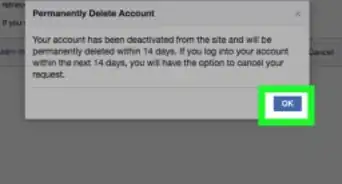
5Click OK. This will submit your code. If it's correct, another pop-up window will appear.
- If you incorrectly entered your password or captcha code, you'll be asked to try again.
-
6Click OK to delete your account. It's at the bottom of the pop-up window. Total account deletion can take up to 14 days, but your account will be gone from Facebook after that time frame.


Community Q&A
-
QuestionHow can I delete a Facebook account permanently without waiting for 14 days?
 Community AnswerYou don't have to wait 14 days, the account will disappear immediately. This term is for that case if you change your mind and want to activate your profile again.
 -
QuestionIf I permanently delete my account, will I be able to log in again?Community AnswerNo. When you "permanently delete" your Facebook account, you delete all traces to it and will not be able to log into it again.
-
QuestionWhen I delete my account, what message do my friends get?
 Community AnswerNo message will be provided to any of your contacts. They just won't be able to see your profile anymore.
 -
QuestionWhat can I do if someone created an account in my name?Community AnswerGo to the account page and click the ellipses button next to "Message." Then, click the option that says "Report." You can then report the page as someone pretending to be you. Facebook will remove the page shortly afterwards.
-
QuestionCan people still see the messages I've sent if my account is permanently deleted?
 Community AnswerYes, messages and photos still remain. However, your name will be changed to ‘Facebook User‘.
 -
QuestionMy account has been hacked and the password has been changed. How can I delete the account?
 R2_d2000Top AnswererYou don't need to delete your account, you just need to change your password, and you might want to consider enabling two step verification, but regardless of whether you want to delete your account or not, you will need to read this article to reset your password.
 -
QuestionIf I permanently delete my Facebook account, will the pictures I sent to my friends through personal message will also be deleted?
 JednrejCommunity AnswerNo. They are in your friends’ personal inboxes. You have no way to delete them.
 -
QuestionMy father passed away and I want to delete his account. Is this the right way to do it? Unfortunately, today I got a reminder for his birthday, which was very sad for me.R2_d2000Top AnswererI'm sorry for your loss, this article will help you delete his account. If you don't know his password, this article might be able to help.
-
QuestionWhat happens if I am tagged in other people's photos?
 Community AnswerOnce you've deleted your profile, then your tags will disappear. Your name might still appear in the person's photo description, but it won't link to any profile page.
 -
QuestionHow can I retrieve pictures that were posted to Facebook before deleting my account?Community AnswerYou can save your pictures in any backup file offline before permanently deleting.
Warnings
- You will not be able to restore your account after the 2 weeks of the permanent deletion process have passed.Thanks!
- Facebook may still retain information from your account in their databases.Thanks!