X
wikiHow is a “wiki,” similar to Wikipedia, which means that many of our articles are co-written by multiple authors. To create this article, volunteer authors worked to edit and improve it over time.
The wikiHow Tech Team also followed the article's instructions and verified that they work.
This article has been viewed 14,434 times.
Learn more...
Steps
Method 1
Method 1 of 2:On Twitter Website (Desktop)
Method 1
-
1Go to Twitter. Open twitter.com in your web browser and sign in with your account.
-
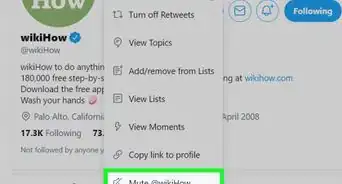
2Go to the profile of the person you want to unmute. You can view your list of muted accounts from Muted accounts settings.
-
3
-
4Done. Now you can see the "Unmuted @username" message. If you want to undo this action, just click on the Undo from the message.


Method 2
Method 2 of 2:In Twitter Lite (Mobile)
Method 2
-
1Go to Twitter Lite on your browser or launch the app. Log in to your account.
-
2Open the account which you want to mute. Click on the 3 dots ( ⋮ ) icon at the top.
-
3Unmute the account. Select Unmute from there.
-
4Done. Now you can see the "Successfully Unmuted." message.


Community Q&A
-
QuestionHow can I make someone else unmute me?
 Community AnswerYou can't. Only the person who muted you can decide whether or not they want to unmute you.