wikiHow is a “wiki,” similar to Wikipedia, which means that many of our articles are co-written by multiple authors. To create this article, volunteer authors worked to edit and improve it over time.
The wikiHow Tech Team also followed the article's instructions and verified that they work.
This article has been viewed 17,751 times.
Learn more...
If you use Google frequently, you can skip a step and make reaching the website easier by setting it as your homepage. With this, each time you launch Safari, the browser window will immediately take you to Google. No need to type its URL on the address bar or look for it from your bookmarks. You can only do this for your computer, either PC or Mac, as the Safari app on iOS devices does not have this configuration.
Steps
Method 1
Method 1 of 2:Setting the Homepage to Google on PC
-
1Launch Safari. Look for Safari on your PC and open it. The web browser will load.
-
2Click on the gear button. This should be on the upper right corner of the browser, beside the search bar. Clicking the gear will bring down the main menu.Advertisement
-
3Click “Preferences” from the menu. A small tabbed window will appear with the different preferences available for Safari.
-
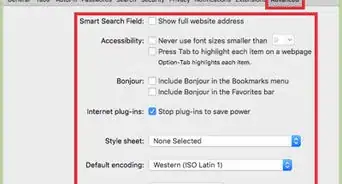
4Find the Homepage field. Click the General tab from the small window and look for the Homepage field.
-
5Set the homepage to Google. Type in https://www.google.com on the Homepage field then click on the “X” button on the upper right corner of the small window. A confirmation box will appear.
- Click the “Change Homepage” button to save your change and exit the window.
Advertisement


Method 2
Method 2 of 2:Setting the Homepage to Google on Mac
-
1Launch Safari. Look for Safari on your Mac and open it. The web browser will load.
-
2Click “Safari” from the header menu bar. This will bring down the main menu.
-
3Click “Preferences” from the menu. A small tabbed window will appear with the different preferences available for Safari.
-
4Find the Homepage field. Click the General tab from the small window and look for the Homepage field.
-
5Set the homepage to Google. Type in https://www.google.com on the Homepage field then click on the red dot on the upper left corner of the small window. A confirmation box will appear.
- Click the “Change Homepage” button to save your change and exit the window.
Advertisement