X
wikiHow is a “wiki,” similar to Wikipedia, which means that many of our articles are co-written by multiple authors. To create this article, 14 people, some anonymous, worked to edit and improve it over time.
This article has been viewed 237,328 times.
Learn more...
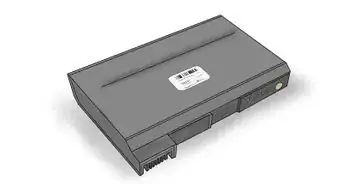
The new 6 cells laptop battery can die after 600-800 charge cycles, forcing people to spend roughly $80 or more to order a replacement. Before you dispose of it safely, start from the first step to learn how to hack the battery back to life.
Steps
-
1Disconnect the battery from your laptop. There should be 2 catches, slide them to unlocked and slide it out.
-
2Pry the battery apart. You may also need some patience and a sharp flathead screwdriver or a butter/putty knife.Advertisement
-
3You will see 6-8 cells connected to a circuit board. This is the battery controller. Look near the connector to find the board, and trace the wires. Carefully examine every cells by a multimeter to ensure the cells are fully discharged.
-
4Make a note of where the wires connect to. This is important.
-
5Use a soldering iron/electric welding tool to separate cells from the wires. Then take them out of the case.
-
6Then solder/weld the new cells together. Remember to refer back to the note you made in Step 4.
-
7Put the new cells into the case. Solder/weld back the wires and cells.
-
8In the end put both rows of cells back together. Let it rest for about 48 hours.
-
9Your hack is complete! Insert your battery and start charging. Turn it on, and you're back in business!Advertisement


Community Q&A
-
QuestionWhat if I have a battery that is the same size with a bigger capacity?
 Community AnswerAssuming you are referring to the individual "cells" that make up a "battery", they must be the same chemistry (for example, lithium-ion is pretty common) to be charged correctly by the controller (that's the circuit board in the battery). The rated voltages must also match. If you can find cells of a higher capacity (mAh or WattHour) with the right chemistry that happen to fit into your old box, that's great. You just increased the capacity (and charging time) of your battery. This is because the charging circuit uses voltage to determine the charge. But don't bin the old cells straight away in case you have some excessively fussy circuitry in there!
 -
QuestionCan you replace the cells in the battery with normal rechargeable batteries of the same physical size?
 Community AnswerNo, because they have to be the correct amperage and voltage to power the laptop. You need to use the proprietary replacement batteries only.
 -
QuestionHow to I join four cells together?Community AnswerYou want a guide on "soldering", for which you need a soldering iron in this case. And solder + flux + practice at the least to do a lasting job. Chances of four cells being joined to each other in an ordinary battery are very very slim though.. When one cell goes, it takes any cells joined in series down with it fairly rapidly. For this reason, rechargeable cells usually have one connection each to the controller, or at the very most, cells linked in pairs to to the controller. When joining cells in series, solder + to -, + to -, + to -.
-
QuestionWhy does it have to rest for 48 hours?
 Community AnswerSo the cells that are connected to each other in parallel have the chance to balance with one another. Actually, best practice is to pre-wire the paralleled batteries together with 10-ohm resistors between them and let them rest overnight. This will balance the batteries so they're perfect when you actually install them in the pack.
 -
QuestionCan one charge laptop batteries using combined cellphone chargers that make the 19v needed? If yes, how?Community AnswerNo, because a phone charger is not a "battery charger"; it basically converts 230v 60hz AC to 5v DC so it can be transferred through your phone's charging port. The actual charger is built into the smartphone (it converts 5v to approx 3.7v and monitors the charging process).
-
QuestionWhat do I do if my batteries are good, but my laptop keeps telling me to consider replacing my battery?
 Community AnswerIt is merely a sales gimmick. Ignore the messages.
 -
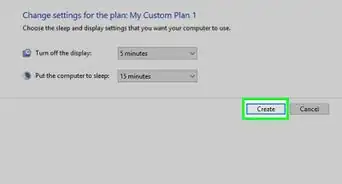
QuestionMy battery is showing low health but it worked more then 2 hours. How can I change it to normal?Community AnswerIn Windows, Search Edit power plan in Control Panel and Click on "Change advanced power settings" Then click on the + near "Battery" then click on "Low battery level" and "Critical battery level" and the other settings there and then change those settings.
-
QuestionI believe the female side of the connection on my laptop to be bad. What do I do?Community AnswerFirstly, see if the wire sticking out of the end of your charger/laptop is not bent. If they are bent, try bending the wire back with tweezers or a toothpick. If that does not work, you may need to get a replacement DC jack. On some laptops, the charging end is a single replaceable part (like on a Dell Latitude 2110) and sometimes it's part of the motherboard entirely (like on those piece of junk HP streams and Chromebooks) Take apart your laptop and see if the individual DC jack can be replaced or has a broken connection, or if its on the motherboard you may need to see if there is a bad trace or if tour motherboard may have gone bad.
-
QuestionIf the laptop battery is unable to be removed, what do I do next?
 Rudy TothCommunity AnswerHow did they install it at the factory? If they can install it there, then you can un-install it elsewhere. Each laptop has a special out of the way/sight function switch to release the battery/memory slots. You really have to investigate your laptop's manual, which is the final frontier of the computer. I have an HP laptop and it is easy to remove.
Warnings
- In all, if you are not an expert at DIY stuff, don't try to hack dead laptop batteries. Buying a new one is the best choice.Thanks!
- Watch for strangely-shaped battery packs (e.g. batteries for the Thinkpad T61 and Inspiron 6400).Thanks!
- Do everything carefully, as the cells can explode if you strike it hard or the cells are too hot when you weld them.Thanks!
Advertisement




About This Article
Advertisement