X
wikiHow is a “wiki,” similar to Wikipedia, which means that many of our articles are co-written by multiple authors. To create this article, 13 people, some anonymous, worked to edit and improve it over time.
The wikiHow Tech Team also followed the article's instructions and verified that they work.
This article has been viewed 27,097 times.
Learn more...
YouTube recently launched an audio library, which includes a large collection of music tracks that are freely available for YouTube creators to download and feature as background music in their videos.
Steps
-
1Open your favorite browser.
-
2Go to YouTube.com.
-
3Click the "Sign In" button at the top right corner of the page.
-
4Enter your email address and password.
-
5Click "Sign in".
-
6Click on the thumb image at the top right corner of the page.
-
7Click on the “Creator Studio” button.
-
8Click “Create” on the left hand side menu.
-
9Select “Audio Library” from the drop down menu.
-
10Find the most popular tracks in the YouTube audio library. You can do this in the "Featured" tab.
-
11Sort audio tracks based on genre, mood, instrument and duration.
-
12Mark an audio track as a favorite if you like one.
- You can access these tracks in the Favorites tab.
-
13Use the search box to find specific tracks or tracks from a specific artist.
-
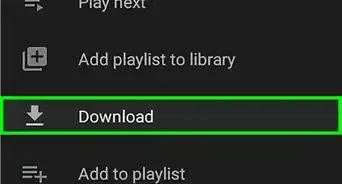
14Download the files to your computer. Click the down arrow button.


Community Q&A
-
QuestionHow do I download a YouTube video?
 R2_d2000Top AnswererTo download a YouTube Video, follow the steps on this article .
 -
QuestionIf l don't have an email address, what can l do?R2_d2000Top AnswererYou can create an email account . Most services are free and easy to use.





References
- How to Download Free Music for Your YouTube Videos Original source of article, shared with permission
- Free music for your videos in Audio Library - research source