This article was written by Nicole Levine, MFA. Nicole Levine is a Technology Writer and Editor for wikiHow. She has more than 20 years of experience creating technical documentation and leading support teams at major web hosting and software companies. Nicole also holds an MFA in Creative Writing from Portland State University and teaches composition, fiction-writing, and zine-making at various institutions.
This article has been viewed 2,456,306 times.
If you try to watch an age-restricted YouTube video, you'll be asked to sign in to YouTube to prove that you're over 18. Sometimes that isn't possible—maybe you're using a shared computer, don't have a Google account, or you aren't over 18. This wikiHow article teaches you about some workarounds for watching age-restricted YouTube videos when you can't (or don't want to) sign in.
Steps
Question 1
Question 1 of 4:What's the easiest way to get past YouTube age restrictions?
-
1Create a YouTube account with the right age. Whether your typical YouTube account is under-18, or you just want to watch the video anonymously, creating a new Google/YouTube account is the simplest way to get past age restrictions. There's no limit to the number of YouTube accounts you can create, and you can sign up with any name and age you'd like. If you're in the United States, you won't be asked to supply ID to verify your age.
- If you're creating a new account in Europe, you'll be asked to prove your age with a credit card or ID.[1] You can avoid this by using signing up from a US-based IP address, such as through a VPN (a free trial will do the trick), or the Tor web browser.
- If you're using a computer, phone, or tablet with parental restrictions and can't create a new Google account, you can do so from any other computer, phone, or tablet.

Question 2
Question 2 of 4:Which Android app I could use?
-
1Try NewPipe for Android. NewPipe is a free app that lets you watch age-restricted videos on your phone or tablet in any region.[2] But there's a (minor) catch—NewPipe isn't available from the Play Store. You'll have to install it a little differently than you would with other apps. But don't worry—as long as you get it from the right place, it's safe! Here's how:
- Make sure your Android can download apps from unknown sources.
- Open a web browser on your Android and go to https://github.com/TeamNewPipe/NewPipe/releases. This is official site of NewPipe—don't download it from other sources.[3]
- Tap the latest version of NewPipe at the top of the page.
- Scroll down and tap NewPipevxxxx.apk (the "xxxx" will be the actual version number).
- Agree to the download if prompted.
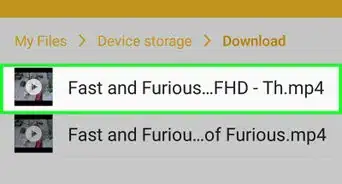
- Open your Downloads folder—if you have an app called Files or My Files, tap that and select Downloads. If not, you'll probably have an app called Downloads—tap it to open the folder.
- Tap the .APK file and follow the on-screen instructions to install. Once installed, its icon will be added to your app list.
- Once NewPipe is installed, launch it, enable "Show age restricted content" in Settings > Content, and then search for your favorite age-restricted YouTube videos.

Question 3
Question 3 of 4:Which iPhone app can I use?
-
1You can use the YouTube app. As long as you can sign in with an 18-or-older YouTube account, you'll be able to watch any age-restricted video. It used to be possible to use apps like VLC Media Player and KM Player to play any video without having to log in, but YouTube has restricted all possibilities.

Question 4
Question 4 of 4:Isn't there an app I can install on my computer?
-
1You can use FreeTube for Windows or macOS. FreeTube is a free app that lets you view any content on YouTube without having to sign in or verify your age. It's the only remaining desktop app that will let you watch 18-and-older YouTube videos without having to sign in. You can download it from https://freetubeapp.io/#download.
- Once you download FreeTube, just search for the video you want to watch in the app. All videos on YouTube are now accessible!
- FreeTube also lets you subscribe to any channel you wish. Your subscribed channels will be saved to your profile.[4]

Community Q&A
-
QuestionDo I have to be signed in for this to work?
 Community AnswerIf you are signed in and your age is verified, there is no point in following these steps. Otherwise, do this without logging in.
 -
QuestionCan I use this to get past pay videos?
 AdrianTop AnswererNo, this will not work for paid content videos. This will only work for age restrictions.
 -
QuestionWill this work on mobile?AdrianTop AnswererYes, it should. Since all the methods on this article still stay within the YouTube video player, YouTube will automatically optimize for mobile browsers.
-
QuestionIs there any way to get past restrictions while still on the YouTube website?AdrianTop AnswererYes. Try changing the /watch?v= part in the URL to /embed/ and the age restriction should be removed.
-
QuestionIf I have Fortiguard and I'm on a school iPad and most of this is blocked, is there anything else that will work? I can't download anything.
 Community AnswerUse a proxy website. Just google "proxy sites," go into one, and you can do whatever you want there.
 -
QuestionHow do I bypass age restrictions on the YouTube app or third party YouTube apps?Community AnswerYou can only use these methods in a browser, so you can't do it without leaving the app.
-
QuestionHow do I bypass age restrictions on YouTube videos if there is no URL on mobile?
 Community AnswerUsually there is a "copy URL" or "Share" option in the mobile apps without URL. Copy it and do the steps above on a phone browser.
 -
QuestionWhat could happen if I used this trick to get past YouTube videos that require payment?
 Community AnswerThese likely would not work on paid videos, only age restricted ones.
 -
QuestionCan a kid get in trouble for bypassing age restrictions on YouTube?Community AnswerIf you're talking about getting in trouble from YouTube, no, there's no way they'd ever find out. If you're talking about from your parents, yes, they might be upset and they might punish you.
-
QuestionWhy can't I watch age-restricted videos on YouTube without signing in?Community AnswerBecause part of establishing an account is entering your date of birth; without signing in, YouTube has no way of knowing your age.
Warnings
- Don't try to get past age restrictions at school or work. You wouldn't want your teacher or boss to see seeing the video you're watching. You could face disciplinary action if you are caught.Thanks!
- Make sure to clear the history or browse in incognito mode if you don't want anyone to see that you watched the video.Thanks!
- Don't try doing this if you are under legal age or it is illegal to view NSFW content in your area or regionThanks!


References
About This Article

1. Go to https://freetubeapp.io/#download on your computer.
2. Download FreeTube for your PC or Mac.
3. Install FreeTube.
4. Search for a video.
5. Click it to start watching.