X
This article was co-authored by wikiHow Staff. Our trained team of editors and researchers validate articles for accuracy and comprehensiveness. wikiHow's Content Management Team carefully monitors the work from our editorial staff to ensure that each article is backed by trusted research and meets our high quality standards.
The wikiHow Tech Team also followed the article's instructions and verified that they work.
This article has been viewed 7,353 times.
Learn more...
This wikiHow teaches you how to remove a chat message from a Viber conversation on your account, using a computer.
Steps
-
1Open Viber on your computer. The Viber icon looks like a purple speech bubble with a white phone icon in it. You can find it in your Applications folder on a Mac, or on the Start menu on Windows.
-
2Click the speech bubble icon on the top-left. This button is located in the upper-left corner of the app window. It will open a list of all your chats on the left panel.
-
3Click a chat on the left panel. Find the chat you want to edit on your Chats list and open it.
-
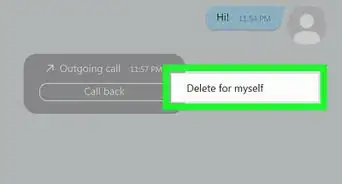
4Right-click a message in the conversation. Find the message you want to delete in the chat conversation, and right-click on the message bubble. This will open your options on a drop-down menu.
-
5Select Delete for myself on the right-click menu. This will delete the selected message from your chat conversation.
- Deleted chat messages will still show up on your contact's account. You can only delete messages from your own phone or computer.



About This Article

wikiHow Staff
wikiHow Staff Writer
This article was co-authored by wikiHow Staff. Our trained team of editors and researchers validate articles for accuracy and comprehensiveness. wikiHow's Content Management Team carefully monitors the work from our editorial staff to ensure that each article is backed by trusted research and meets our high quality standards. This article has been viewed 7,353 times.
How helpful is this?
Co-authors: 2
Updated: August 26, 2018
Views: 7,353
Categories: Viber for Computers