X
wikiHow is a “wiki,” similar to Wikipedia, which means that many of our articles are co-written by multiple authors. To create this article, volunteer authors worked to edit and improve it over time.
This article has been viewed 41,682 times.
Learn more...
If you've ever looked at your ALT key and wondered what it was for, this guide is for you! We'll show you cool functions and shortcuts to try with this handy key.
Steps
-
1Using just the Alt key, see for yourself how it switches between the above Task Bar and your internet browser's current page.
-
2
-
3Press the Alt key again, and keyboard control will return to the web page (allowing you to scroll with the arrow keys, for example).
-
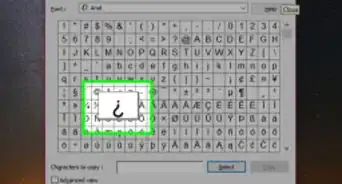
4Used in combination with other keys, the alt key can type characters not available on the keyboard, or alter the functionality of another key.
- Hold down Alt, type 12 on the Number Pad (make sure number lock is OFF), and let go of Alt. In most text input boxes this will generate the female symbol.
- Alt + 11 generates the male symbol.
- Alt + 13 generates a musical note. Experiment with different numbers and see what you come up with, or use the Character Map (Windows OS) to check what the alt code for a certain character is.
-
5Other commonly used combinations that include the alt key: Alt + Tab (shuffles between windows that are on your "Start Bar"), Alt + Left Arrow (goes to the last internet page you visited), Alt + Home Key (Returns to your home page).


Community Q&A
-
QuestionIn Internet Explorer 9 and up, what keyboard button do I press to open the menu bar (to see "Tools") so I can change the homepage?
 Whu LCommunity AnswerYou can see every hotkey on the Microsoft page, but for your specific question it's Alt+T.
 -
QuestionWhich is the shortcut key to move the cursor in the first cell in a row inside the table?
 Community AnswerFirst cell in worksheet: CTRL + HOME First cell in selected range: CTRL + UP
 -
QuestionWhat key with Alt will switch from a PowerPoint to a video in a web browser?
 Community AnswerHolding Alt and pressing Tab will let you scroll through your open programs.
Warnings
- Violently beating your keyboard after dying in a video game may result in the loss of your Alt Key.Thanks!