This article was written by Nicole Levine, MFA. Nicole Levine is a Technology Writer and Editor for wikiHow. She has more than 20 years of experience creating technical documentation and leading support teams at major web hosting and software companies. Nicole also holds an MFA in Creative Writing from Portland State University and teaches composition, fiction-writing, and zine-making at various institutions.
This article has been viewed 7,115 times.
This wikiHow teaches you how to manually update a device driver on your Windows PC. Windows keeps most drivers up to date automatically, but checking manually can be a helpful troubleshooting step.
Steps
-
1Press ⊞ Win+S. This opens the search bar at the bottom-left corner of the screen.
- On Windows versions under Windows 10, search is located in the Start menu/screen.
-
2Type device manager. As you type, a list of matching results will appear.
-
3Click Device Manager. It should be the first (or only) result.
-
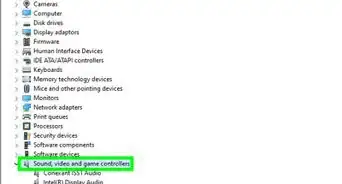
4Click the arrow next to the type of device. This expands a list of connected devices of that type.
- For example, if you want to update your network card drivers, click the arrow next to “Network adapters.”
-
5Right-click the device you want to update. A menu will expand.
-
6Click Update Driver Software….
-
7Click Search automatically for updated driver software. Windows will now search online for updated versions of the driver. If a newer version is found, it will be downloaded and installed.
- If you already have the latest version, you’ll see a message that says “The best driver software for your device is already installed.” You can click Close to exit that window.
- If you downloaded an updated driver to your computer, click Browse my computer for driver software, then double-click the driver to install it.





About This Article

1. Open search.
2. Type device manager.
3. Click Device Manager.
4. Click the arrow next to the device type.
5. Right-click the device.
6. Click Update Driver Software…
7. Click Search automatically for updated driver software.