X
This article was co-authored by wikiHow Staff. Our trained team of editors and researchers validate articles for accuracy and comprehensiveness. wikiHow's Content Management Team carefully monitors the work from our editorial staff to ensure that each article is backed by trusted research and meets our high quality standards.
This article has been viewed 55,501 times.
Learn more...
This wikiHow teaches you how to delete the WhatsApp Messenger app from your Android.
Steps
-
1
-
2Scroll down and tap Apps on the Settings menu. This will open a list of all the apps installed on your Android.
- Depending on your device, this option may be labeled Applications instead of Apps.
-
3Find and tap WhatsApp on the Apps list. This will open the App info page for WhatsApp.
-
4Tap the Uninstall button. You will have to confirm your action in a pop-up window.
-
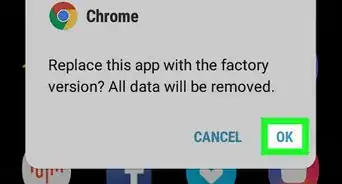
5Tap OK in the confirmation window. This will uninstall WhatsApp from your Android.





About This Article

wikiHow Staff
wikiHow Staff Writer
This article was co-authored by wikiHow Staff. Our trained team of editors and researchers validate articles for accuracy and comprehensiveness. wikiHow's Content Management Team carefully monitors the work from our editorial staff to ensure that each article is backed by trusted research and meets our high quality standards. This article has been viewed 55,501 times.
How helpful is this?
Co-authors: 2
Updated: February 26, 2018
Views: 55,501
Categories: Install & Uninstall Software | WhatsApp