X
wikiHow is a “wiki,” similar to Wikipedia, which means that many of our articles are co-written by multiple authors. To create this article, volunteer authors worked to edit and improve it over time.
This article has been viewed 371,028 times.
Learn more...
Finished with Dropbox on your Mac? Want to uninstall it? Follow the steps of this article to make sure it all gets removed.
Steps
Part 1
Part 1 of 4:Removing the Software and Folders
Part 1
-
1Find Dropbox on your Mac menu bar. Click on the Dropbox icon.
-
2Quit Dropbox. Click on the Cog icon and then click Quit Dropbox.Advertisement
-
3Locate Dropbox in your Applications folder. Delete it by either right-clicking and selecting Move to Trash, or dragging it to your Trash Can.
-
4Locate your Dropbox folder to delete it too, if desired. Either right-click on the folder and select Move to Trash, or drag it to your Trash Can.
- Note that deleting the folder will also delete the contents. If these files are not saved in the cloud in your Dropbox account, you may want to copy them to another safe folder before deleting the Dropbox folder.
-
5Remove Dropbox from your Sidebar, if necessary. If you'd like to do this, right-click on the Dropbox name and select Remove from Sidebar.Advertisement


Part 2
Part 2 of 4:Removing the Dropbox Contextual Menu
Part 2


Part 3
Part 3 of 4:Removing the Dropbox Application Settings
Part 3


Part 4
Part 4 of 4:Removing Dropbox from Your Finder Toolbar
Part 4


Community Q&A
-
QuestionI'm having trouble removing Dropbox. What should I do if I did not unlink Dropbox first?
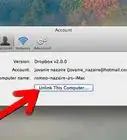
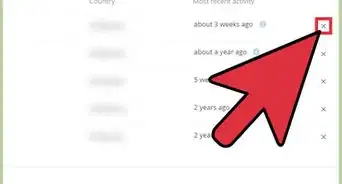
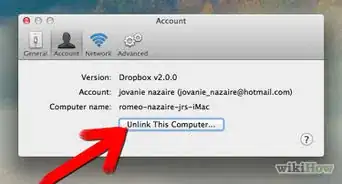
 Jamie “Neproshennie” IvanovCommunity AnswerIf you go to dropbox.com and go to your account settings, there will be a security tab where you can see all of your linked devices. From there, you can forcibly unlink the account from the device, or if you forgot to remove Dropbox, you can unlink the device AND have the dropbox application erase all of your dropbox content on that machine.
 -
QuestionDropbox won't delete because some of its extensions are open. What should I do?
 RuahCommunity AnswerIf it won't delete, then close those extensions. Once they are closed, it should delete.
 -
QuestionHow do I find the account settings on Dropbox?
 Community AnswerLog in and click on the avatar at the top-right corner, then select 'Settings'. On the page there is a 'Security' tab at the top, and down that page you will see the 'Device' section (where you can unlink a device).
 -
QuestionHow do you close the extensions?Community AnswerOpen Activity Monitor (search for it with spotlight) and force quit the Dropbox process (you can use the searchbox on the right to find it). After that, you can delete the application.
-
QuestionWhat do I do if I can't delete Dropbox if the extensions are open?Community AnswerOpen Activity Monitor (search for it with Spotlight) and force quit the Dropbox process (you can use the searchbox on the right to find it). After that, you can delete the application.
-
QuestionDropbox won't uninstall because some of its extensions are running in the background. How do I find what extensions are running?
 Community Answer1. Control-click on the 'Dropbox' folder under 'Applications' and select 'Show Package Contents'. 2. Open it and delete the 'Plugins Folder'. 3. Afterwards, you should be able to remove the application.
Warnings
- Beware that deleting your Dropbox folder may result in a loss of the most recent version of the files contained in it, if they haven't been synced to your online Dropbox account or moved elsewhere on your computer before deletion.Thanks!
Advertisement
References
- https://www.dropbox.com/help/41/en -- research source
About This Article
Advertisement