X
wikiHow is a “wiki,” similar to Wikipedia, which means that many of our articles are co-written by multiple authors. To create this article, volunteer authors worked to edit and improve it over time.
This article has been viewed 26,789 times.
Learn more...
Android Oreo is the 8th version of the Android operating system, which was released on August 21, 2017. In this new operating system, you can easily capture any screen with its built-in screenshot tool.
Steps
-
1Unlock your phone. Navigate to the screen or app you would like to capture. If you want to take a screenshot of a web page, use your web browser to visit the page.
-
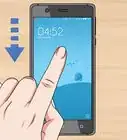
2Open the Notification panel. Swipe down from the top of the screen and drag the status bar downwards to expand the option.
- Alternatively, use your two fingers to swipe down the panel.
Advertisement -
3Tap on the Screenshot or Screen capture icon. If you can't see it there, swipe left to see more options. You will hear camera shutter sounds that indicate your screenshot has been successfully taken.
-
4Swipe down from the top of the screen to view the screenshot. You can also view your screenshots in the Photos app. Done!Advertisement


Community Q&A
-
QuestionHow do I find a will to live?
 WFTop AnswererJust find the meaning of your life. Read How to Find Meaning in Life.
 -
QuestionWhere are they stored?
 Community AnswerUsually under /screenshots or /pictures/screenshots.













About This Article
Advertisement