X
wikiHow is a “wiki,” similar to Wikipedia, which means that many of our articles are co-written by multiple authors. To create this article, volunteer authors worked to edit and improve it over time.
This article has been viewed 62,300 times.
Learn more...
What if you want to explore any site after some time and your bookmarks bar is filled with links? At that time you can save a link so that it can be made into a shortcut. Let's learn how.
Steps
-
1
-
2Search for the page.Advertisement
-
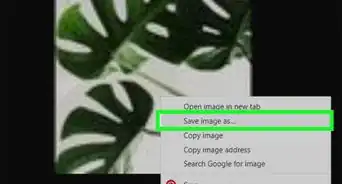
3Right click on the link and there will be a fourth option, "Save link as...."
-
4Click on that and you will find a dialog box opened.
-
5Enter the path where you want to save your link.
-
6Write the name for the link.
-
7Click on save button.
-
8The link will be downloaded.
-
9Close Google Chrome.
-
10Go the path where you saved your link and find the link.
-
11Click on the link and the browser window will open with the link.
-
12Finished!Advertisement


Community Q&A
-
QuestionHow do I open a mail link? When I click on it, it's not opening.
 Community AnswerCopy and paste the think into the browser. Links sometimes do not work for everyone.
About This Article
Advertisement