This article was co-authored by Stan Kats. Stan Kats is a Professional Technologist and the COO and Chief Technologist for The STG IT Consulting Group in West Hollywood, California. Stan provides comprehensive technology solutions to businesses through managed IT services, and for individuals through his consumer service business, Stan's Tech Garage. Stan holds a BA in International Relations from The University of Southern California. He began his career working in the Fortune 500 IT world. Stan founded his companies to offer an enterprise-level of expertise for small businesses and individuals.
This article has been viewed 424,402 times.
This wikiHow teaches you how to reset your Netgear router to its factory defaults.
Steps
Method 1
Method 1 of 2:On Most Netgear Routers
-
1
-
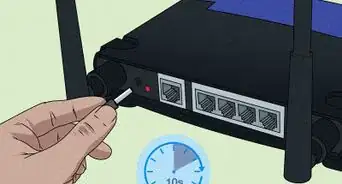
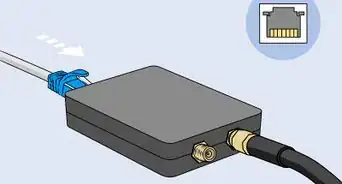
2Insert a bent paper clip into the recess.[3]
-
3Gently press and hold the button for about 15-20 seconds. The power light will begin to blink.[4]
-
4Release the "Reset" button. The router will reboot and the power light will glow a solid green or white.
- The Netgear router will be restored to its factory settings. Follow the instructions in the documentation for your model to set up and configure your router.


Method 2
Method 2 of 2:On DGN2000 or DG834Gv5 Netgear Routers
-
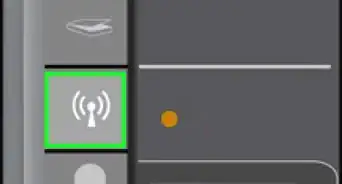
1Locate the buttons on the side of the router labeled "Wireless" and "WPS."[5]
-
2Press and hold the "Wireless" and "WPS" buttons simultaneously for 6 seconds. The power LED will blink red.
-
3Release the buttons. The router will reboot and the power LED will be solid.
- The Netgear router will be restored to its factory settings. Follow the instructions in the documentation for your model to set up and configure your router.


Community Q&A
-
QuestionIs every router's process the same when it comes to factory resetting it?
 Stan KatsStan Kats is a Professional Technologist and the COO and Chief Technologist for The STG IT Consulting Group in West Hollywood, California. Stan provides comprehensive technology solutions to businesses through managed IT services, and for individuals through his consumer service business, Stan's Tech Garage. Stan holds a BA in International Relations from The University of Southern California. He began his career working in the Fortune 500 IT world. Stan founded his companies to offer an enterprise-level of expertise for small businesses and individuals.
Professional TechnologistNo, it's going to be unique from brand to brand. On most routers, there's a little pinhole on the back with a button you can push using a paper clip or something like that. You can typically do that on most devices to reset them. -
QuestionHow long does it take for the router to reset?Stan KatsStan Kats is a Professional Technologist and the COO and Chief Technologist for The STG IT Consulting Group in West Hollywood, California. Stan provides comprehensive technology solutions to businesses through managed IT services, and for individuals through his consumer service business, Stan's Tech Garage. Stan holds a BA in International Relations from The University of Southern California. He began his career working in the Fortune 500 IT world. Stan founded his companies to offer an enterprise-level of expertise for small businesses and individuals.
Professional TechnologistThis is going to be a little different from router to router, but it's usually going to take 15-20 seconds. -
QuestionHow do I change my router's password?Stan KatsStan Kats is a Professional Technologist and the COO and Chief Technologist for The STG IT Consulting Group in West Hollywood, California. Stan provides comprehensive technology solutions to businesses through managed IT services, and for individuals through his consumer service business, Stan's Tech Garage. Stan holds a BA in International Relations from The University of Southern California. He began his career working in the Fortune 500 IT world. Stan founded his companies to offer an enterprise-level of expertise for small businesses and individuals.
Professional TechnologistYou're going to do this in the web interface. You typically just browse your device's IP address, then you can change the password so long as you have the permissions on your user account. -
QuestionHow can I reset my password for a Netgear router?
 Community AnswerPress the reset button, and if that doesn't work, do a 30/30/30 reset. Hold the reset button for 30 seconds, then unplug the router while still holding the reset button for 30 seconds, then plug the router back in while holding the reset button, so overall you have held it down for 1minute 30seconds. If this doesn't work, connect to your router with your terminal.
 -
QuestionWhat should I do if the lights don't come back on after I press the reset button?
 EyecueCommunity AnswerCheck the power connection to make sure it's still okay. If that does not cure the problem, there may be damage to the unit from resetting it.
 -
QuestionHow do I change my Netgear password?
 Community AnswerDelete the system32 folder on Windows. You then restart the computer and it will ask for a new password.
 -
QuestionHow do I reset my router using a tablet?Community AnswerYou cannot reset a router wirelessly. You must go to the physical router and reset it manually.
-
QuestionHow do I add a password to a router?Asked 15 days agoCommunity AnswerSee Wikihow's article on How to Add a Password to Your Wireless Internet Connection (Wifi).
-
QuestionDo I have to contact my internet provider to reset my router?
 Community AnswerIf they didn't provide the router to you, then no. Resetting the router does reset the password back to the router's defaults, so if your provider gave you the router, you may get locked out.
Things You'll Need
- Pen or paper clip
References
- ↑ Stan Kats. Professional Technologist. Expert Interview. 24 June 2021.
- ↑ https://kb.netgear.com/9665/How-do-I-perform-a-factory-reset-on-my-NETGEAR-router
- ↑ Stan Kats. Professional Technologist. Expert Interview. 24 June 2021.
- ↑ Stan Kats. Professional Technologist. Expert Interview. 24 June 2021.
- ↑ https://kb.netgear.com/31010/How-do-I-perform-a-factory-reset-on-my-DGN2000-or-DG834Gv5-router
About This Article

1. Locate the "Reset" button.
2. Insert a bent paper clip.
3. Gently press and hold the button for 7 seconds.
4. Release the "Reset" button.