X
This article was co-authored by wikiHow Staff. Our trained team of editors and researchers validate articles for accuracy and comprehensiveness. wikiHow's Content Management Team carefully monitors the work from our editorial staff to ensure that each article is backed by trusted research and meets our high quality standards.
The wikiHow Tech Team also followed the article's instructions and verified that they work.
This article has been viewed 732,858 times.
Learn more...
This wikiHow teaches you how to log in to a Linksys router using a Web browser on your computer.
Steps
-
1Connect your computer to the network. Connect to the same network the Linksys router is on.
-
2Go to http://192.168.1.1 in a Web browser. This should connect you to the router.
-
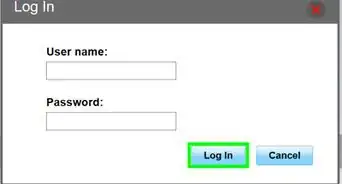
3Enter your username in the labeled field. If you haven't changed the username from the factory default, leave it blank.
-
4Enter your password in the labeled field. If you haven't changed your password from the factory defaults, type admin in the password field.[1]
-
5Click Log In.


Community Q&A
-
QuestionHow do I find my password?
 Community AnswerIf you haven't changed it, you can research your model of router online to find out the default administrative login. If you've changed it and can't recall your password, you'll likely have to do a factory reset on the router to restore its settings to those when you first purchased it.
 -
QuestionDoes wifi support Facebook login for free access?
 Community AnswerIt might -- it depends on what type of wifi service you get.
 -
QuestionHow can I boost my WiFi in the house?
 Community AnswerPut it in the middle of our house so it can be accessed just about anywhere, and if need be, buy a WiFi extender for any areas you have trouble getting a connection. These work really well and they're inexpensive.
 -
QuestionWhere can I find the gateway IP?Community AnswerUnder your router will be the default Gateway IP. Use that IP address to log into your router. On Windows, use ipconfig (a command used in command prompt) to find it. It will be labeled as "Default Gateway." On Mac, it will be "ifconfig | grep "inet " | grep -v 127.0.0.1"
-
QuestionI accidentally changed my router to remote access. How can I get back into it?
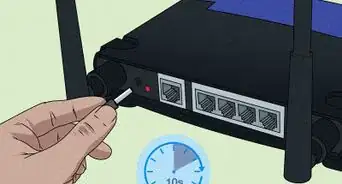
 Community AnswerHold down the reset button (very tiny button you'll find on your router) for 10 seconds and your login credentials will be reset to factory settings. Then enter the default credentials.
 -
QuestionCan I set up my router on another computer in another location and then use it at home?
 R2_d2000Top AnswererYes. The router will save its configuration settings, so you should be good to go.
 -
QuestionHow do I update the software?R2_d2000Top AnswererThis wikiHow article should be able to help you.
-
QuestionI have forgotten my Linksys password. Where can I find it?R2_d2000Top AnswererIf you changed it, then you will need to reset it to change it back to the factory defaults.
About This Article

wikiHow Staff
wikiHow Staff Writer
This article was co-authored by wikiHow Staff. Our trained team of editors and researchers validate articles for accuracy and comprehensiveness. wikiHow's Content Management Team carefully monitors the work from our editorial staff to ensure that each article is backed by trusted research and meets our high quality standards. This article has been viewed 732,858 times.
How helpful is this?
Co-authors: 23
Updated: June 22, 2021
Views: 732,858
Categories: Router Networking Devices
Article SummaryX
1.Connect your computer to the network.
2. Go to http://192.168.1.1
3. Enter your username.
4. Enter your password.
5. Click Log In.
Did this summary help you?