X
wikiHow is a “wiki,” similar to Wikipedia, which means that many of our articles are co-written by multiple authors. To create this article, volunteer authors worked to edit and improve it over time.
This article has been viewed 44,658 times.
Learn more...
What if all of your efforts to remove Netcut don't make a difference? This entry details how to manually remove the Netcut software and clean its leftover traces from your hard drive.
Steps
-
1You first save your online activities and then, you find the above "blue scissors" icon - Netcut's tray - in taskbar, right click on it and launch "Exit" option.
-
2Now you switch to the Administrator mode.
-
3You may use the following 3 options to uninstall Netcut on your computer:
- Option One: Open Start menu >> hit All Programs >> Enter the "arcai.com" folder above >> run the provided "Uninstall NetCut" application.
- Option Two: Go to Control Panel on the start menu >> hit "Add or Remove Programs" or "Uninstall a program" >> look for your installed NetCut product in the programs list >> launch Uninstall option. Note that, by default, WinPcap has been installed along with NetCut app. Remove that WinPcap later if you do not use it at all.
- Find out the "netcut" folder above >> run NetCut's original uninstaller file "unins000" (699 KB).
-
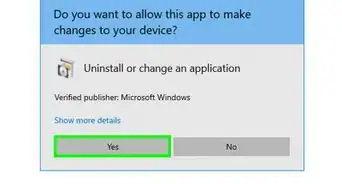
4To proceed with the express uninstall, you must use the administrator rights to run the UAC utility above: choose Yes from that alert.
-
5Click Yes button on the "NetCut Uninstall" above.
-
6You may keep the actskn43.ocx file and then, manually delete it later.
-
7Hit OK to exit that "NetCut Uninstall".
-
8Save your work then restart your machine. Remove the possibly unused WinPcap plus clean associated software traces under Windows Safe Mode with Networking (recommended).


Warnings
- Netcut's ORIGINAL installer package "netcut.exe" (MD5, 59da0505b981f62df58c541e51c0be54) has been flagged as RISKWARE according to Google's VirusTotal.Thanks!