X
wikiHow is a “wiki,” similar to Wikipedia, which means that many of our articles are co-written by multiple authors. To create this article, 20 people, some anonymous, worked to edit and improve it over time.
This article has been viewed 72,063 times.
Learn more...
AppleScript is a powerful English-like scripting program that allows the user to make applications, from helpful math solvers to games. This how-to will show you the basics of AppleScript and how simple it is compared to, say, batch.
Steps
-
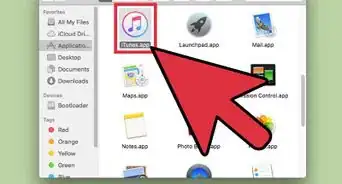
1Locate the Script Editor. The Script Editor should be under AppleScript in the Applications folder.
-
2Learn to search for commands easily in its dictionary. Go to File>Open Dictionary. Select AppleScript application. A window with AppleScript's dictionary will open up and you can search for all the commands you need.Advertisement
-
3Know what the icons in the header are for. Stop stops the recording. Run runs the script. Event Log History shows the history of usage of your script. Result History shows what happened during the time the script ran. Print prints out the script. Bundle Contents bundles the commands in the script.
-
4Learn to save files in different formats. To do this, go to File>Save As. Click on File Format and choose the type of format you need. This is needed for different purposes.
-
5
-
6Learn to use the Script Assistant. It's very useful and handy when you're typing a long and complex program. To get the Script Assistant, go to Script Editor > Preferences. Click editing. Select Use Script Assistant. Quit and reopen Script Editor. Now when you type a command, an ellipsis appears next to it, completing the word. Press F5 to show all the terms possible. Press Enter on the term you need.This makes scripting much easier and faster.
-
7Search the internet. There are many websites about AppleScript.
-
8Read books! There are many great books on scripting.Advertisement


Community Q&A
-
QuestionHow can I write an Apple script that opens an OpenOffice spreadsheet and replaces the updated version?
 Community AnswerYou can get answers and troubleshooting for specific programming questions on programming forums (such as StackOverflow).
Warnings
- Try not to beep too many times, as the user may get annoyed.Thanks!
- Do not create destructive programs.Thanks!
Advertisement
Things You'll Need
- A Macintosh Computer
- AppleScript Editor
- Keyboard
- Mouse


About This Article
Advertisement