This article was written by Travis Boylls. Travis Boylls is a Technology Writer and Editor for wikiHow. Travis has experience writing technology-related articles, providing software customer service, and in graphic design. He specializes in Windows, macOS, Android, iOS, and Linux platforms. He studied graphic design at Pikes Peak Community College.
This article has been viewed 2,599 times.
This wikiHow teaches you how to make a radio station on YouTube Music for iPhone and iPad. Unlike playlists, which are a pre-arranged assortment of songs, radio stations are a random assortment of songs based on an artist, song title, playlist, that you search for.
Steps
-
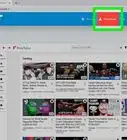
1Open YouTube Music. YouTube Music is the app that has a red circular icon with a white 'play' triangle inside of a smaller white triangle. Tap the YouTube Music app on your homescreen to open YouTube Music.
-
2
-
3Type the name of an artist, song, playlist, or music genre. This displays a list of search results that match what you type.
-
4Tap the search result you want. When you see the artist, song title, playlist name, or other search result you want, tap it in the list of search results. This displays a list of artists, songs, albums, playlists, and videos that match your search result.
-
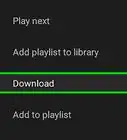
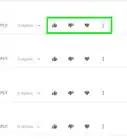
5Tap the menu ⋮ button. The menu button appears to the right of artists, songs, albums, videos, and playlists. This displays a list of menu options in a pop-up menu.
-
6Tap Start radio. It's in the pop-up menu when you tap the button with three vertical dots. It's next to an icon that resembles a 'play' triangle in the center of radio waves. This plays the radio station. You can play, pause, skip forward or backward, or like and dislike the song using the playback controls at the bottom of the screen.
- When you tap on the name of an artist in the search results, you can start a radio station by tapping Radio below the artist's name. This creates a radio station of songs that are similar to the artist.



About This Article

1. Open YouTube Music.
2. Search for a song, artist, or playlist.
3. Tap the menu ( ⋮ ) button to the right of an artist, song, playlist, or video.
4. Tap "Start radio" in the menu.