wikiHow is a “wiki,” similar to Wikipedia, which means that many of our articles are co-written by multiple authors. To create this article, volunteer authors worked to edit and improve it over time.
Learn more...
Many YouTubers choose to sell merchandise once they have grown their audience. There are a number of sites you can use to easily make and sell merchandise for your YouTube channel for free. Once your merch is done, you can advertise it directly on YouTube. This wikiHow article will teach you how to create and sell merchandise through your YouTube channel.
Steps
Part 1
Part 1 of 2:Creating Your Merchandise
-
1Consider your audience. Designing merchandise for the specific audience your channel has attracted is very important. Consider including a recognizable channel icon, a running joke, or something similar on your product to connect with your viewers.
- You can also use the tools under the Analytics menu in YouTube Studio to see what videos have performed the highest, what demographics your audience falls under, and more, then apply that information to your products.
-
2Pick a supported merch retailer. While there are many sites you can use to create merch for your channel, Google has compiled a list of supported retailers that will integrate with your merch shelf on YouTube. You can choose to use an unsupported retailer, but you must use an approved vendor for YouTube integration.
- Your YouTube merch shelf is a menu that will appear under each of your videos showcasing your merchandise, making it an invaluable tool for attracting customers.
- Supported retailers: https://support.google.com/youtube/answer/9454088?hl=en#zippy=%2Csupported-merch-retailers
-
3Create an account on the site you have chosen. Look for a Sign Up button on the site of your choice, then follow the instructions on screen to create your account.
-
4Design your product(s). Depending on the site, a prompt should appear about designing your products. Use the built-in merch designer on your site, then save your product, and your store has been set up!
- If you would like to use a custom image, you will likely have to design it yourself, then upload it to the site.

Part 2
Part 2 of 2:Setting Up Your Merch Shelf on YouTube
-
1Sign in to https://studio.youtube.com/. Be sure to use the same Google account that you use for your YouTube channel.
-
2Select Monetization. This button is in the menu at the left side of the screen and has a dollar sign icon.
- Be aware that to set up monetization, your channel must have at least 1,000 total subscribers and more than 4,000 public watch hours in the past year.[1]
-
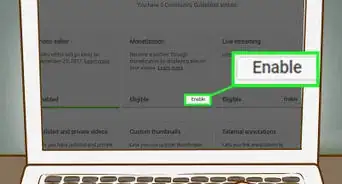
3Click the Merchandise tab. This option will only be available if your channel meets the eligibility requirements.[2]
-
4Follow the instructions on screen to enable and set up your merch shelf. Once you have completed these steps, your merchandise will begin appearing under your videos!



References
About This Article
1. Pick a merch retailer that is supported by Google.
2. Create an account on the chosen site and design your merch with your specific audience in mind.
3. Sign into YouTube Studio.
4. Select the Monetization button from the menu on the left side of the screen, then click Merchandise.
5. Follow the instructions on screen to enable your merch shelf and link your products.