This article was written by Nicole Levine, MFA. Nicole Levine is a Technology Writer and Editor for wikiHow. She has more than 20 years of experience creating technical documentation and leading support teams at major web hosting and software companies. Nicole also holds an MFA in Creative Writing from Portland State University and teaches composition, fiction-writing, and zine-making at various institutions.
The wikiHow Tech Team also followed the article's instructions and verified that they work.
This article has been viewed 133,339 times.
If you're new to Ubuntu and you're thinking about that how to install and uninstall software on your OS, then you should read this article. You can install and uninstall software on Ubuntu in two ways: Through command line (Terminal) or with Ubuntu Software Center. In this article, you will see you how to install and uninstall software on Ubuntu using Terminal.
Steps

Method 1
Method 1 of 2:Install Software Using Terminal
MPlayer
-
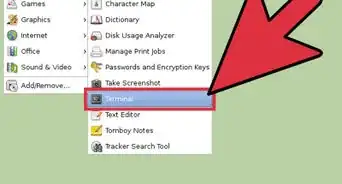
1To install MPlayer, you need to type following command to the Terminal (press Ctrl+Alt+T on your keyboard) or use copy/paste method: sudo apt-get install mplayer (then hit Enter)
-
2When it asks you for password, don't be confused. The password is that one, which you're using in the Login Screen. Password does not show up in the terminal when you type it. Just type your password and hit Enter. If your password was entered correctly, the action will continue.
-
3When it asks you do you want to continue, type ’y’ (then hit Enter)
-
4Wait for installation to be completed. After that, if you want to run MPlayer, you need to type following command to the Terminal: mplayer (then hit Enter)


Method 2
Method 2 of 2:Uninstall Software Using Terminal
-
1To uninstall MPlayer, you need to type following command to the Terminal (press Ctrl+Alt+T on your keyboard) or use copy/paste method: sudo apt-get remove mplayer (then hit Enter)
-
2When it asks you for password, don't be confused. The password is that one, which you're using in the Login Screen. Password does not show up in the terminal when you type it. Just type your password and hit Enter. If your password was entered correctly, the action will continue.
-
3When it asks you do you want to continue, type ’y’ (then hit Enter)
-
4Wait for uninstallation to be completed. After that, close your Terminal. That's all.


Community Q&A
-
QuestionWhen installing a program using terminal do I have to be a superuser?
 SomoneCommunity AnswerNot always, but most programs need you to add 'sudo' prior to the command, essentially making you superuser.
About This Article

1. Run sudo apt-get update.
2. Run sudo apt-get install packagename.
3. Use sudo apt-get remove packagename to uninstall.