X
wikiHow is a “wiki,” similar to Wikipedia, which means that many of our articles are co-written by multiple authors. To create this article, 9 people, some anonymous, worked to edit and improve it over time.
This article has been viewed 9,282 times.
Learn more...
If you'd like to use the MCPatcher to help your Minecraft game, this article explains how to do so. Note that this method works for some mods only––you may need Modloader or a similar program.
Steps
Part 1
Part 1 of 2:Installing McPatcher
Part 1
-
1Google MCPatcher and open the top link (usually MinecraftDL) and scroll down the page, it should say Download MCPatcher for 1.7.9 or whichever the current Minecraft version is, click that link, then find the DLL (Download link).
-
2When download is complete, drag MCPatcher out of your download folder and onto your desktop.Advertisement
-
3Double-click MCPatcher to run.
-
4Click patch when you have added your texture/mod.Advertisement


Part 2
Part 2 of 2:Installing Texture Packs
Part 2
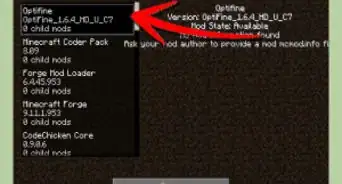
For Texture Packs. Texture packs will say "This texture pack requires MCPatcher of Optifine (a very useful mod, get it)".
-
1Download the texture pack you want.
-
2Click your windows button, then type in %appdata% and hit enter. find .minecraft and open that. (it's best to right-click and create a shortcut on the desktop for easy access). Find the "resource packs" folder and put you texture pack in there.
-
3Run MCPatcher.
-
4Click "Patch".
-
5Run Minecraft.Advertisement


=== Installing the Mods ===
Method One
-
1Download your mod.
-
2Open .minecraft > bin > minecraft / minecraft.jar > open with > WinRAR/7zip > delete the META-INF folder > open your mod file, drag and drop all the files into the bin folder. (Doesn't work for all mods, be sure to watch an installation tutorial).
-
3Open the MCPatcher and hit Patch.Advertisement


Method Two






-Step-12.webp)

-Step-9.webp)

References
- http://www.planetminecraft.com/blog/how-to-use-mcpatcher-easy/ - Original source, shared with permission
About This Article
Advertisement