X
wikiHow is a “wiki,” similar to Wikipedia, which means that many of our articles are co-written by multiple authors. To create this article, volunteer authors worked to edit and improve it over time.
This article has been viewed 253,044 times.
Learn more...
There are two types of bin files, self extracting archives and programs you run as they are, I'll mention both...
Steps
-
1If the bin file is an installer/self-extracting archive, first download the thing and keep it somewhere safe just to avoid having to download it again.
-
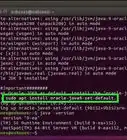
2Enter the terminal.Advertisement
-
3Enter Root mode, like so : su - (the hyphen is required) and provide the root password.
-
4If needed copy the bin file to its final output folder - packages like the Java Runtime Environment require this. Read the online instructions first...
-
5Change directories (folders) to the one containing the bin file, like so : cd /topmost/folder, for example cd /usr/share
-
6Give the bin file execute permissions: chmod +x thefile.bin
-
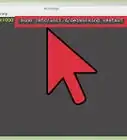
7Execute it: ./thefile.bin - the dot-slash has to be there
-
8If the bin file is the program itself, chances are the file is compressed, untar/unzip in the destination folder, Firefox comes like that.
-
9Copy the archive and unpack it in the output folder, that should produce a folder.
-
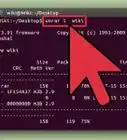
10Enter the folder, locate the program - it is a bin file, give it execute permissions if need be (see step 6).
-
11Make a starter for convenience, right-click on the desktop, select the option you need and follow the lead - an icon should appear.Advertisement


Warnings
- Be careful where you put things - an unzip could overwrite stuff you needThanks!
- If the program needs to be run system-wide, put it in a central spot , /usr/share is a good candidateThanks!
- If you're a system-admin, avoid that the users do this...it'll mess up the systemThanks!
- Use this as a last resort, try to stick to the repository of your distribution of linux if at all possible.Thanks!
Advertisement
About This Article
Advertisement