This article was written by Jack Lloyd. Jack Lloyd is a Technology Writer and Editor for wikiHow. He has over two years of experience writing and editing technology-related articles. He is technology enthusiast and an English teacher.
The wikiHow Tech Team also followed the article's instructions and verified that they work.
This article has been viewed 878,217 times.
This wikiHow teaches you how to see a wifi network's service set identifier (SSID), which is simply the name of the network your computer is connected to. If you are connected to a wireless network, the SSID is the name of the Wi-Fi network you are connected to. Seeing a network's SSID is as simple as opening your computer's Wi-Fi settings and looking at the network's name.
Steps
Method 1
Method 1 of 2:On Windows
-
1
-
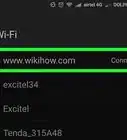
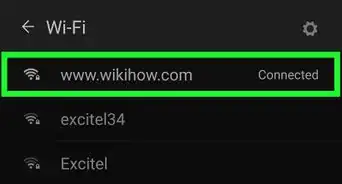
2Find your current network's name. The network you're connected to will appear at the top of the pop-up window. You'll see "Connected" beneath its name.
-
3Review the other available network SSIDs. You'll see a list of network names in the pop-up window; each of these names is a specific network's SSID.


Method 2
Method 2 of 2:On Mac


Community Q&A
-
QuestionHow do I find my SSID on my HP PC?
 Community AnswerHP is a brand. You're most likely running a Windows OS. Thus, please refer to method 1 of this article, "Finding Available SSIDs in Windows."
 -
QuestionHow do I connect my tablet to the Internet?
 Community AnswerVisit your settings folder, then look for a section called "WiFi" or "Internet." Tap on that heading to reveal WiFi hotspots near you. Tap the name of the network to which you wish to connect and enter the password, if necessary, to connect to the Internet.
 -
QuestionHow do I find my SSID on my Samsung smart phone?Community AnswerGo to Settings > Wi-Fi. There you will find all the available SSIDs of the Wi-Fi networks around you, and the SSID of the network to which you are currently connected.
-
QuestionHow can I find my SSID using an Android tablet?
 Community AnswerGo to settings > wifi. There you will find all the available SSIDs of the Wi-Fi networks around you, and the SSID of the network to which you are currently connected.
 -
QuestionHow do I find Wi-Fi hotspots?Community AnswerMany public spaces have WiFi hotspots. Try going to a shopping mall, a McDonald's, a cafe, or a university near you.
-
QuestionHow would I find the correct SSID for my computer and new modem?Community AnswerUsually the provider of the new modem has placed a sticker on the back of the modem with the SSID numbers and password that will allow you to add them to your computer.
-
QuestionHow do I find the SSID on my Dell computer?Community AnswerDell is a brand of computer, not operating system. Your computer is most likely running Windows, just refer to the first part of this article.
Warnings
- You cannot view another network's factory-assigned name without access to the physical router.Thanks!

-Step-6-Version-5.webp)
-Connection-Step-12-Version-5.webp)


About This Article
1. Click the Wi-Fi icon.
2. View the available network names (SSIDs).