This article was co-authored by wikiHow Staff. Our trained team of editors and researchers validate articles for accuracy and comprehensiveness. wikiHow's Content Management Team carefully monitors the work from our editorial staff to ensure that each article is backed by trusted research and meets our high quality standards.
Learn more...
This wikiHow teaches you how to evolve a Paras into Parasect in Pokémon GO, using any version of the game on mobile or desktop. Paras is a bug/grass-type Pokémon, and is the part of a two-member family.[1] In other Pokémon games, you will only need to level your Paras up to Lv. 24 in order to evolve into Parasect.
Steps
-
1Open Pokémon GO on your phone or tablet. The Pokémon GO icon looks like a red-and-white Pokéball on a blue background. You can find it on your home screen, in an app folder, or on the Apps tray.
-
2Tap the Pokéball icon at the bottom of the map. You'll see a Pokéball at the bottom of your screen when you're on the main map page. Tap this button to open the game menu.Advertisement
-
3Tap the POKÉMON button on the bottom-left. This button looks like a blue PIkachu outline on a white button on the menu. It will open your Pokémon list.
- You can find a list of all the Pokémon you have here.
-
4Find and tap your Paras. Scroll down your Pokémon list, and tap the Paras you want to evolve.
- This will open the selected Pokémon's details on a new page.
-
5Check if you have enough Paras candy to evolve. You can find your total Paras candy below your Pokémon's name, HP, type, and weight/height information.
- Paras needs 50 total Paras candy to evolve. You'll see the required candy next to the EVOLVE button here.
- If you don't have enough candy, you can walk around the map and catch more Paras. You will receive more Paras candy with each new Paras you catch.
- If you have multiple Paras in your bag, you can trade your extras to Professor Willow for one candy each.
-
6Tap the green EVOLVE button. You can find it below the "POWER UP" option on the details page.
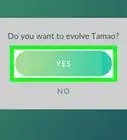
- You will need to confirm in a pop-up window.
-
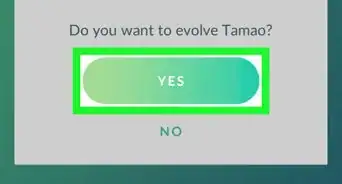
7Tap YES in the confirmation pop-up. This will confirm your action, use 50 Paras candy from your total, and evolve your Paras into Parasect.
- You'll see an evolution animation when you confirm. You'll receive your new Parasect at the end of the animation.
Advertisement






References
About This Article

1. Open Pokémon GO.
2. Tap the Pokéball icon at the bottom.
3. Tap POKÉMON.
4. Tap your Paras.
5. Tap EVOLVE.
6. Tap YES.