This article was co-authored by wikiHow Staff. Our trained team of editors and researchers validate articles for accuracy and comprehensiveness. wikiHow's Content Management Team carefully monitors the work from our editorial staff to ensure that each article is backed by trusted research and meets our high quality standards.
This article has been viewed 3,524 times.
Learn more...
This wikiHow teaches you how to change your Windows computer's interface from the basic theme to Aero mode. Aero includes various design upgrades, such as reflective appearance, enhanced layouts, and updated application instructions.
Steps
-
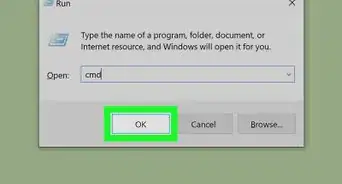
1Open the Run application on your computer. The Run window allows you to directly open any application or document on your computer.
- You can open Run from the Start menu, or press the ⊞ Win+R shortcut on your keyboard.
-
2Type cmd into the Run window. This shortcut opens the Command Prompt application.Advertisement
-
3Press ↵ Enter on your keyboard. This will open Command Prompt in a new window.
-
4Type net start uxsms into Command Prompt.
-
5Press ↵ Enter on your keyboard. This will switch your computer to the Aero theme.Advertisement




About This Article

1. Open the Run application from the Start menu.
2. Type "cmd" into Run.
3. Press Enter.
4. Type "net start uxsms" into Command Prompt.
5. Press Enter.