X
wikiHow is a “wiki,” similar to Wikipedia, which means that many of our articles are co-written by multiple authors. To create this article, 9 people, some anonymous, worked to edit and improve it over time.
This article has been viewed 61,998 times.
Learn more...
Veoh is a popular video streaming service. Unfortunately, its video player is littered with adware and difficult to use. Luckily, there are several ways that you can download the videos to your computer or mobile device. Using a video downloading website allows you to save the videos to any device. You can use a Firefox extension to quickly download the videos on your computer.
Steps
Method 1
Method 1 of 2:Using a Website
Method 1
-
1Visit a video downloading site. There are many sites that can rip videos from streaming services. KeepVid.com works on your computer or mobile device. KeepVid is one of the only sites that will reliably download Veoh videos.[1]
- Another popular site that supports Veoh is "SaveVideo.me". The process is virtually identical to KeepVid.
-
2Copy the URL of the video. Open the Veoh page for the video you want to save. Select the entire URL (address). Copy it to your clipboard.Advertisement
-
3Paste the URL into the KeepVid URL box. KeepVid will have a URL box in the center of the page. Paste the URL into this field.
-
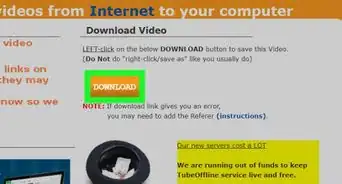
4Click or tap the "Download" button. This will take you to a list of links.
-
5Click the "Download MP4" link. Most Veoh videos will only have one link available. Click the link to begin downloading the file.
- If you're using SaveVideo.me, you'll need to rename the video to include the MP4 extension. This makes the site less suitable for mobile devices.
-
6Wait for the download to complete. Veoh is slow, so the download will take a while to finish.Advertisement


Method 2
Method 2 of 2:Using Firefox
Method 2
-
1Click the Firefox Menu button (☰). Using a Firefox extension is one of the easiest ways to download Veoh videos.
-
2Select "Add-ons". This will load the Add-ons manager.
-
3Search for "downloadhelper". Video DownloadHelper is one of the most popular add-ons. You can use a different add-on if you'd prefer. The process will likely be very similar.
-
4Click "Install" next to "Video DownloadHelper". This will install the Video DownloadHelper extension for Firefox. You can use this add-on to save videos from Veoh and other sites.
-
5Open the Veoh video you want to download. Make sure to load the video's dedicated page.
-
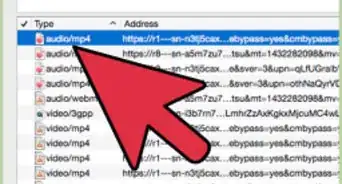
6Click the DownloadHelper button in the Firefox toolbar. This will open a list of download options for the video.
-
7Find and click the largest link towards the top of the list. You'll sometimes get several results from DownloadHelper. Find the largest MP4 file available. This is usually the whole video file.
-
8Wait for the download to finish. Veoh is a fairly slow service. The video will likely take a while to download.
-
9Play the file. You can start playing it in your media player, or transfer it to a mobile device. You can find it in your Firefox Downloads folder.Advertisement









About This Article
Advertisement