X
This article was written by Travis Boylls. Travis Boylls is a Technology Writer and Editor for wikiHow. Travis has experience writing technology-related articles, providing software customer service, and in graphic design. He specializes in Windows, macOS, Android, iOS, and Linux platforms. He studied graphic design at Pikes Peak Community College.
The wikiHow Tech Team also followed the article's instructions and verified that they work.
This article has been viewed 4,043 times.
This wikiHow teaches you how to convert Java objects to Json on PC or Mac. In this tutorial, we will be using the Objectmapper class from the Jackson library. This is the most basic way to convert Java objects to Json.
Steps
-
1Add the following dependencies to the pom.xml file. These dependencies will add "jackson-annotations-2.9.3.jar", "jackson-core-2.9.3.jar", and "jackson-databind-2.9.3.jar". Be sure to include the latest version of the Jackson databind under "Version".
<dependency>
<groupid>com.fasterxml.jackson.core</groupid>
<artifactid>jackson-databind</artifactid>
<version>2.9.3</version>
</dependency>
-
2Type the objectmapper code. This will start the objectmapper class of the Jackson library.
ObjectMapper mapper = new ObjectMapper();
-
3Type the object name. Type the following code. Type the actual name of the Java object that you convert to Json. For example, if the Java object is named "Student", the code would read Student Student = new Student();
ObjectName ObjectName = new ObjectName();
-
4Type the writeValue for Json. This will create an output Json file after the Java object is converted. Type the intended path of the json file in place of "c:\\Jsonfile.json". Type the name of the Java object you want to convert to Json in place of "ObjectName".
mapper.writeValue(c:\\Jsonfile.json, ObjectName);
-
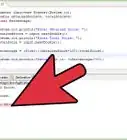
5Review your outcome. The entire code should look something like this:
ObjectMapper mapper = new ObjectMapper();
ObjectName ObjectName = new ObjectName();
mapper.writeValue(c:\\Jsonfile.json, ObjectName);


-Step-42.webp)
-Step-4-Version-2.webp)
About This Article

Travis Boylls
Tech Specialist
This article was written by Travis Boylls. Travis Boylls is a Technology Writer and Editor for wikiHow. Travis has experience writing technology-related articles, providing software customer service, and in graphic design. He specializes in Windows, macOS, Android, iOS, and Linux platforms. He studied graphic design at Pikes Peak Community College. This article has been viewed 4,043 times.
How helpful is this?
Co-authors: 3
Updated: August 17, 2019
Views: 4,043
Categories: Java
-Step-42.webp)