This article was co-authored by wikiHow Staff. Our trained team of editors and researchers validate articles for accuracy and comprehensiveness. wikiHow's Content Management Team carefully monitors the work from our editorial staff to ensure that each article is backed by trusted research and meets our high quality standards.
This article has been viewed 10,737 times.
Learn more...
This wikiHow teaches you how to use your iPhone or iPad as a remote with your Apple TV. This feature is only available on iOS 11. If you don't see the features below, you may need to update your iPhone's or iPad's operating system to iOS 11 if you haven't already done so.
Steps
Part 1
Part 1 of 2:Adding Apple TV Remote to Control Center


Part 2
Part 2 of 2:Opening the Apple TV Remote
-
1Make sure your iPhone is connected to the same Wi-Fi network as the Apple TV. Make sure your Wi-Fi is turned on and you are connected to the same Wi-Fi network as the Apple TV. To do this:
- Open Settings.
- Tap Wi-Fi.
- Tap the Wi-Fi switch ON.
-
2Launch the Control Center. On most iPhones, swipe up from the very bottom of the screen to launch the Control Center. On the iPhone X, slide down from the top-right of the display to access Control Center.[1]
-
3
-
4Wait for the iPhone to detect the Apple TV. This can take a few moments.
-
5Tap the Apple TV you want to add. If there are multiple Apple TV's connected to the Wi-Fi network, you will need to select the Apple TV you want to pair with.
-
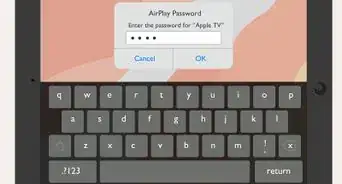
6Enter the 4-digit code that is on your AppleTV. If you have an Apple TV 4K or 4th Generation Apple TV, you'll need to enter the code that appears on the Apple TV. Older model Apple TVs will connect automatically.
-
7Press the buttons and swipe on the trackpad to control the AppleTV. Use the virtual remote that is on your iPhone's screen to control the Apple TV in the same manner as the Apple TV remote.




About This Article

1. Connect to the same WiFi network as the Apple TV.
2. Swipe up from the bottom of the screen to open Control Center.
3. Tap the Apple TV icon.
4. Wait for the iPhone to detect the Apple TV.
5. Tap the Apple TV you want to add.
6. Enter the 4-digit code on the Apple TV.
7. Tap the buttons and swipe on the trackpad to control the Apple TV.