This article was co-authored by Darlene Antonelli, MA. Darlene Antonelli is a Technology Writer and Editor for wikiHow. Darlene has experience teaching college courses, writing technology-related articles, and working hands-on in the technology field. She earned an MA in Writing from Rowan University in 2012 and wrote her thesis on online communities and the personalities curated in such communities.
This article has been viewed 2,727 times.
This wikiHow will teach you how to connect an Oculus Quest or Quest 2 to a computer using Oculus Link. Before you can use Link, you'll need an appropriate high-quality USB/USB-C cable that's capable of supporting data and power, which should optimally be about 10ft long. Any electronics retailer, like Best Buy or Amazon, should carry an appropriate cable. Your computer must also meet the minimum requirements for Oculus Link before you can continue, which include an Intel i5-4590 or an AMD Ryzen 5 1500x or greater processor, AMD 400+ or some NVIDIA GPUs (like the NVIDIA Titan X), 8+ GB RAM, and a Windows 10 operating system.[1]
Steps
-
1Download the Oculus app on your computer. The included paperwork with your Quest and Quest 2 should include a download link, but you can always go to https://www.oculus.com/accessories/oculus-link/ and click Download Software under the "Oculus Software" header.
- You can find more about supported and not supported GPUs at https://support.oculus.com/444256562873335.
-
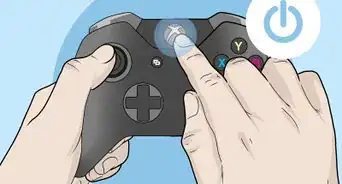
2Power on your Quest. You'll find the power button located on the top of the headset and hold it for at least 2 seconds.Advertisement
-
3Plug in the USB-C end of the cable to your headset. You'll find the USB-C port on the left side of the headset.
-
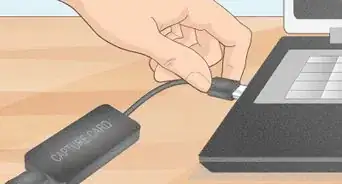
4Plug in the USB end of the cable to your computer. There are likely some USB ports on the front of your computer tower as well as some in the back.[2]
-
5Select Allow. You'll need to allow your computer to access data from your Quest files.[3]
-
6Select Enable. This activates Oculus Link and uses your computer resources to power it.
- If you don't see the window to enable Oculus Link, disconnect the USB-C cable and try again.[4]
Advertisement



-Step-13.webp)







References
About This Article

1. Download the Oculus app on your computer.
2. Power on your Quest 2 and put it on.
3. Plug in the USB-C end of the cable to your headset.
4. Plug in the USB end of the cable to your computer.
5. Select Allow.
6. Select Enable.

-Step-13.webp)