This article was written by Travis Boylls. Travis Boylls is a Technology Writer and Editor for wikiHow. Travis has experience writing technology-related articles, providing software customer service, and in graphic design. He specializes in Windows, macOS, Android, iOS, and Linux platforms. He studied graphic design at Pikes Peak Community College.
The wikiHow Tech Team also followed the article's instructions and verified that they work.
This article has been viewed 114,752 times.
If you have a private Instagram account, potential followers will have to request permission to access your photos and videos. This wikiHow teaches you how to approve a follower request on the Instagram app. Currently, you cannot approve a follower using the desktop app or a web browser.
Steps
-
1Open the Instagram app on your phone. It's the app that has a purple, pink, and orange icon with an image that resembles a camera. Tap the icon to open Instagram on your iPhone, iPad, or Android phone or tablet.
-
2Tap the heart-shaped icon. It's at the bottom of the Instagram app and to the right of the plus (+) icon. If your phone is using iOS 13 or later, the heart icon may be at the top left of your screen instead. There may be a pink dot below this icon that indicates there is new activity notifications.Advertisement
-
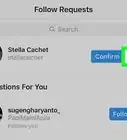
3Tap Follow Requests. It's at the top of your Activity page. If you have new follow requests, there will be a blue dot with the number of requests next to it on the right.
-
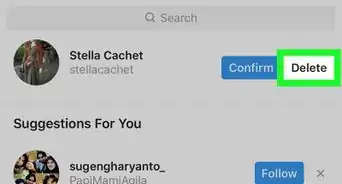
4Tap Confirm next to the person you would like to approve. This instantly approves the follow request.
- If you would rather deny the request, tap Delete next to the username you want to deny.
- If you'd like to follow the person back, tap the Follow button that appears.
Advertisement


Community Q&A
-
QuestionHow can I post on Instagram without using the app?
 Community AnswerYou can go to the Instagram website and post or if you're using certain other apps you can often "share" your post with Instagram.
 -
QuestionWhy won't my Instagram follow requests work?
 Community AnswerTo approve your requests, tap the checkmark. If the issue persists, you should contact Instagram support.
 -
QuestionI got a notification that someone requested to follow me, and when I went to confirm, it wasn't there anymore. Why?Community AnswerIt means they have cancelled the request originally sent. The notifications are sent immediately so you will still get the notification, even if it was cancelled.
-
QuestionHow can I accept and deny followers as well as post on Instagram without using the Instagram app?
 Community AnswerYou can accept and deny follow requests on the website, but you must post using the app.
 -
QuestionDoes a follow request mean that someone wants to follow me?Yes, a follow request means that another Instagram user wants to follow your private Instagram account. You can either accept the request (allow them to follow you) or delete the request (don't allow them to follow you).
-
QuestionAre followers on Instagram approved before they can follow you?If your account is private, you must approve a user's follow request before they can view your posts. However, if you have a public account, anyone can follow you and you don't have to approve them first.
-
QuestionHow do I know if my follower request was approved on Instagram?Community AnswerThe person will now be following you and will able to see your content. If someone else accepted your follow request, their account will be in your "Following" list.



About This Article