This article was co-authored by wikiHow Staff. Our trained team of editors and researchers validate articles for accuracy and comprehensiveness. wikiHow's Content Management Team carefully monitors the work from our editorial staff to ensure that each article is backed by trusted research and meets our high quality standards.
The wikiHow Tech Team also followed the article's instructions and verified that they work.
This article has been viewed 1,045,344 times.
Learn more...
Using Instagram can be confusing sometimes, especially when you're new to the app. Following people is a major part of the site, and can become hard if you just joined. Luckily, this wikiHow teaches you how to follow friends, celebrities, and organizations on Instagram.
Steps
-
1Open the Instagram app by tapping the icon on your phone. The icon looks like a camera and should say “Instagram” underneath it.
- If prompted, select your Instagram account and log in.
-
2Open the search tab by tapping the magnifying glass at the bottom of the screen.Advertisement
-
3In the search bar at the top of the screen, type the name of the person or organization you want to follow.
-
4Tap the name of the user you want to follow.
- If the user you’re looking for doesn’t show up, ask them what their Instagram username is.
- If you want to follow a celebrity or organization but can't find their account, try searching for their Instagram username on Google.
-
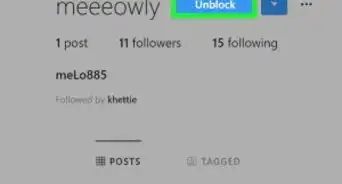
5Tap the "Follow" button at the top of the screen.
-
6Follow additional users on Instagram from your Facebook friends and Contacts.
- Select your profile by tapping the button shaped like a person at the bottom-right of the screen.
- Tap the “⋮” at the top right of the page to open more options.
- Under “Follow People,” tap “Facebook Friends” to follow users from your Facebook friends, and tap “Contacts” to follow users from your phone’s contact list.
Advertisement


Community Q&A
-
QuestionHow can I follow people with a private account?
 Community AnswerYou will have to send a request and wait for them to respond. You'll know they accepted your request when you can see their posts.
 -
QuestionCan my followers see who I am following?
 Community AnswerYes they can. If your account is public, anyone can see who you are following.
 -
QuestionCan the person I follow text me?
 Community AnswerYes, anyone on Instagram can contact anyone. You don't need to follow them and they don't need to follow you to text you.
 -
QuestionCan the people I follow on Instagram see my profile information?Community AnswerIf your profile is private, they would have to request to follow you and if you approve them, they would then be able to see your all of your posts and profile information.
-
QuestionCan I join Instagram just to follow someone without posting anything?
 Amy HarrisonTop AnswererYes; however, you will still need to fully register to use the Instagram app.
 -
QuestionCan I only see things from people I follow? If I follow someone, do I see everything they like?Community AnswerThe activity you see is based on the user's profile privacy. If their account is private, you won't be able to see their activity, but you can if their account is public. Also, you can go at the notifications and click on Following and it will show some recent activities of people you follow.
-
QuestionCan anyone follow me without me knowing?Amy HarrisonTop AnswererNo. If your account is on public, then they can choose to follow you without you needing to accept it, but it will show in your notifications. If you are on private, then the person trying to follow you will need to request it first.
-
QuestionWhat should I do if it won't let me follow someone?Community AnswerIf you've been following a lot of people at once, then that's probably why. This issue is usually resolved by waiting an hour or so, maybe longer, before trying to follow people again.
-
QuestionHow do I see the posts of someone I am following?Community AnswerWhen you open Instagram, you'll automatically see any posts from the accounts that you're following.
-
QuestionWhy did I get an accepted follow request from someone I didn't request to follow?Community AnswerYou might have requested someone before they changed their username. It's also possible that you accidentally requested to follow them without realizing it.


About This Article

1. Open the Instagram app.
2. Tap on the search tab (magnifying glass).
3. Type the name or username of the person you want to follow.
4. Tap the result that matches who you’re looking for.
5. Press the “Follow” button.