This article was written by Nicole Levine, MFA. Nicole Levine is a Technology Writer and Editor for wikiHow. She has more than 20 years of experience creating technical documentation and leading support teams at major web hosting and software companies. Nicole also holds an MFA in Creative Writing from Portland State University and teaches composition, fiction-writing, and zine-making at various institutions.
The wikiHow Tech Team also followed the article's instructions and verified that they work.
This article has been viewed 160,428 times.
This wikiHow teaches you how to change a Windows XP PC's language and keyboard layout from United States English to UK English. If you're using Windows 10, check out How to Change the Windows 10 Language.
Steps
-
1Click the Start menu. It's usually at the bottom-left corner of the screen.[1]
-
2Click Run…. It's near the bottom of the menu. The "Run" box will appear.
-
3Type intl.cpl into the box and press ↵ Enter. This opens the "Regional and Language Options" window.
-
4Click the Languages tab. It's the second tab at the top of the window.
-
5Click Details. This opens the "Text Services and Input Languages" window.
-
6Click Add. It's on the right side of the "Installed Services" list.[2] "
-
7Select English (United Kingdom) from the "Input language" menu.
-
8Select United Kingdom from the "Keyboard layout/IME" menu.
-
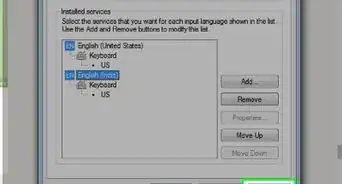
9Click OK. This returns you to the "Text Services and Input Languages" window.
-
10Select English (United Kingdom) from the "Default input language" menu. It's at the top of the window.
-
11Click OK and then OK again. This saves your changes and adds the Language Bar to the taskbar, which says "EN."
-
12Click the Language Bar. It's the "EN" on the taskbar. A list of installed languages will appear.
-
13Click English (United Kingdom). You have now switched from US English to UK English.
- Hover your mouse cursor over the Language Bar at any time to see which language you're using.
-Step-1-Version-2.jpg)
-Step-2-Version-2.jpg)
-Step-3-Version-2.jpg)
-Step-4-Version-2.jpg)
-Step-5-Version-2.jpg)
-Step-6-Version-2.jpg)
-Step-7.jpg)
-Step-8.jpg)
-Step-9.jpg)
-Step-10.jpg)
-Step-11.jpg)
-Step-12.jpg)
-Step-13.jpg)
Community Q&A
-
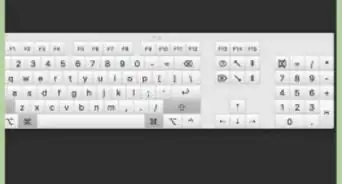
QuestionShift 2 and 3 display the wrong things, how do I rectify (Windows 10)?
 Community AnswerPress the ENG tab at the bottom right of your screen, and then click English (United Kingdom) or English (United States) depending on what layout your keyboard is. They're both QWERTY, so select the one that isn't currently selected.


References
About This Article

1. Click Start and select Run.
2. Type "intl.cpl and press Enter.
3. Click Languages.
4. Click Details.
5. Click Add.
6. Select United Kingdom from both menus and click OK.
7. Select English (UK) as the default language.
8. Click OK until all windows are closed.
9. Click EN in the taskbar and select English (UK).