X
This article was co-authored by wikiHow Staff. Our trained team of editors and researchers validate articles for accuracy and comprehensiveness. wikiHow's Content Management Team carefully monitors the work from our editorial staff to ensure that each article is backed by trusted research and meets our high quality standards.
This article has been viewed 23,299 times.
Learn more...
This wikiHow teaches you how to turn off your camera on FaceTime calls on your iPhone or iPad. Note that unless you receive a FaceTime Audio call, you will always answer with the camera on. While there is no way to answer a video FaceTime call with audio only, you can disable the camera immediately after answering the call.
Steps
-
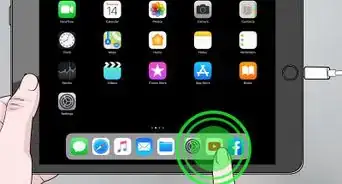
1Answer your incoming FaceTime call. Click the Answer button to pick up the call. Note that unless you receive a FaceTime Audio call, you will always answer with the camera on.
-
2Tap on ••• . You'll usually find this in the bottom right corner of the screen. On some devices, you may be able to swipe up on the options pane at the bottom of the call. This will reveal additional options for your FaceTime call.
-
3
-
4Swipe down on the screen to return to your call. You can turn your camera back on at any time by tapping the ‘Camera Off’ button again.














About This Article

wikiHow Staff
wikiHow Staff Writer
This article was co-authored by wikiHow Staff. Our trained team of editors and researchers validate articles for accuracy and comprehensiveness. wikiHow's Content Management Team carefully monitors the work from our editorial staff to ensure that each article is backed by trusted research and meets our high quality standards. This article has been viewed 23,299 times.
How helpful is this?
Co-authors: 4
Updated: April 6, 2020
Views: 23,299
Categories: Ipad