X
wikiHow is a “wiki,” similar to Wikipedia, which means that many of our articles are co-written by multiple authors. To create this article, volunteer authors worked to edit and improve it over time.
This article has been viewed 36,584 times.
Learn more...
Tinder automatically uses your Facebook’s “Interested In” section to figure out your sexuality and assign you appropriate potential matches. However, you may need to adjust these settings yourself (for example, if you’re “Interested In” section is not set, or is private). Luckily, the app makes it fairly easy for you to do so. You can fix this yourself through your Tinder app’s Settings page.
Steps
-
1Open your Tinder app. If you have used Tinder recently, you may be directed straight to your last page. If not, you will automatically be directed to the Home page, where you can swipe potential matches.
-
2Click the Menu icon in the top left corner. This should look like three orange horizontal lines. Click “Settings” to access your account settings.Advertisement
-
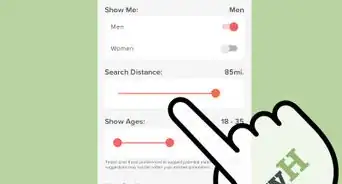
3To adjust which gender(s) you’d like to see in your matches, scroll down to the words “Show Me.” Beside the words “Men” and “Women” are toggle bars that can be set on or off. For each gender, turn the toggle bar on (or green) if you are interested in members of that gender, or off (grey) if you are not. Both can be set to “on” at the same time.Advertisement















About This Article
Advertisement