X
wikiHow is a “wiki,” similar to Wikipedia, which means that many of our articles are co-written by multiple authors. To create this article, 11 people, some anonymous, worked to edit and improve it over time.
This article has been viewed 136,971 times.
Learn more...
Facebook is a social networking website that allows users to connect and communicate with friends and family members. Facebook allows users to add designated types of family members to their profiles. This allows other users to view a Facebook member's family at a glance. You can add your own family on Facebook quickly and easily. More information below the jump.
Steps
-
1Log in to your Facebook account.
-
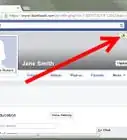
2Go to your own profile page by clicking on the "Profile" link in the top left corner of your screen.Advertisement
-
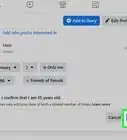
3Click on the gray "Edit Profile" button in the top left corner of your screen.
-
4Click on the "Featured People" link on the left side of your screen.
-
5Add a spouse, partner or significant other. Check the "Relationship Status" at the top of your screen. Depending on your listed relationship status, you may or may not be able to add a spouse, partner or significant other. Selecting 1 of the following relationship status choices will allow you to add a the name of a person with whom you are in a relationship: In a Relationship, Engaged, Married, It's Complicated, In An Open Relationship, In a Civil Union or In a Domestic Partnership. Choosing 1 of these relationship status options will result in you not being allowed to add a spouse, partner or significant other: Single, Widowed, Separated or Divorced.
-
6Add other family members. Click on "Add another family member" to add family members other than a spouse, partner or significant other. Facebook allows you to choose from the following family member types: Daughter, Son, Expected: Boy, Expected: Girl, Expected: Child, Mother, Father, Sister, Brother, Aunt, Uncle, Niece, Nephew, Cousin: Female, Cousin: Male, Granddaughter, Grandson, Grandmother and Grandfather.
-
7Select the family member's name. Type the first few letters of each person's name until the full name appears; then select the name by clicking on it.
-
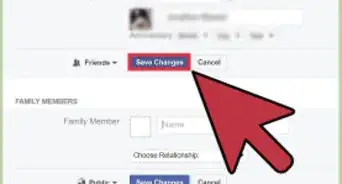
8Click the blue "Save Changes" button at the bottom of your screen.
-
9Repeat this process for each family member you wish to add.
-
10Wait for the family members you've added to confirm your requests. When they do, their name will appear in your profile under familyAdvertisement


Community Q&A
-
QuestionHow can I add a family remember that I've removed as a friend in the past?
 Community AnswerYou can follow the same steps. Removing someone from your friend's list previously doesn't change the process of adding them again.
 -
QuestionWhy isn't my friend getting my sibling's friend request?
 Community AnswerIf your sibling is sure that they're sending a friend request, it could just be a Facebook glitch. I would log out, log back in, and try to send the request again.
 -
QuestionWhat should I do if the wrong Facebook account comes up for my sibling?
 Community AnswerIf you think the Facebook account is someone posing as your sibling, then you should report the account to Facebook as someone pretending to be someone you know.
 -
QuestionHow is it that Facebook coincidentally recommended my older sister to me?Community AnswerSometimes Facebook uses location-based recommendations. It could be that you also have mutual friends, mutual interests, etc.
-
QuestionHow do I remove a family member on Facebook?Community AnswerYou can just go to their profile page, select the "Friend" drop down, and click "Unfriend."
-
QuestionHow do I add a relative's picture?Community AnswerYou would go into the album where you want to add the photo and click "Add Photo." Then, just upload your relative's photo. (Remember, this will appear on your Facebook page, although you can tag your relative in the photo.)
-
QuestionHow do I change the relationship shown on Facebook? For example, this friend is no longer my daughter-in-law, and I want to change that, but not remove her as a friend.
 Community AnswerGo to your profile page and click "About" in the top line of tabs between "Timeline" and "Friends". Next click on "Family and Relationships" between "Contact and Basic Info" and "Details About You" and you will see two subtitles to the right of the left hand column. Hover over the family member and there will be blue text saying "Edit". Click that and there will be a name bar and a drop-down list. Backspace the name and select save changes. This will not unfriend the person, it will only remove them from your family list.
 -
QuestionMy husband doesn't have a Facebook account. How do I put his name in where it says "married" on my relatives?Community AnswerEither create a account for him, or just don't write anything in that section.
-
QuestionWhat do I do if a request is pending for a long time?Community AnswerIf the request is pending for a long time, your relative may have seen it and forgot about it or they may not wish to add you. Your best bet is to just ask them about it.
-
QuestionWhat do the buttons that say "Public", "Friends", "Only me", "Custom", and "Family" do?Community AnswerThey help you decide who the audience of your relationship to the relative is. The options give you permission to choose who sees your relationship.





About This Article
Advertisement