This article was co-authored by wikiHow Staff. Our trained team of editors and researchers validate articles for accuracy and comprehensiveness. wikiHow's Content Management Team carefully monitors the work from our editorial staff to ensure that each article is backed by trusted research and meets our high quality standards.
The wikiHow Tech Team also followed the article's instructions and verified that they work.
This article has been viewed 4,167 times.
Learn more...
Instagram allows you to choose from a selection of licensed music to add backing tracks to your Instagram stories. This wikiHow shows you how to add music to an Instagram story on iPhone or iPad.
Steps
-
1Tap the Instagram app to open it. The icon looks like a white camera outline on a reddish-gold background.
- If you cannot find the icon, swipe right on your device's screen, then type "Instagram" into the search bar at the top of the screen. Tap the icon when it appears in your search results.
-
2Tap the home icon. This icon looks like the silhouette of a house and appears in the lower left corner. Tapping it ensures that you're on the Instagram Home page.Advertisement
-
3Tap the camera icon. This icon appears in the upper left corner of the Home page.
-
4Long-press the large white button. The button is in the bottom center of the screen. This begins recording video for your Instagram story.
-
5Release the button. This stops the video recording.
-
6Tap the sticker option. This option looks like a squared-off human face with the bottom right corner of the face folded inward. It's the center option at the top of your screen.
-
7Tap the Music icon. It's in the center row of stickers.
-
8Tap the song you want to add to your story.
- Instagram sorts available music by popularity, mood and genre. You can also search for a specific song by tapping on the Search Music field and typing an artist or song name.
-
9Swipe left or right on the song timeline. This lets you choose exactly which part of the song you want to match up with your Instagram story.
-
10Tap Done when you've selected your clip. This option is in the top right of the screen.
-
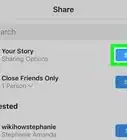
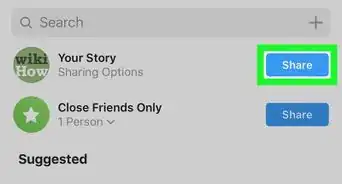
11Tap Your Story. This publishes your new Instagram story to your followers.[1]
- You can also choose your background music before you shoot your video by swiping right on the text menu that runs across the bottom of the camera screen, tapping Music, tapping your desired song, and swiping left and right to choose which part of the song you want to match up with the video you're about to record. When you add music to your video in this manner, the large white button displays music notes in its middle.
Advertisement





About This Article

1. Tap the Instagram app, then swipe right.
2. Hold the white button down to record the video.
3. Tap the sticker option, then tap the Music icon.
4. Tap the song you want to add to your story.
5. Swipe left or right on the song timeline to pick your clip.
6. Tap Done, then tap Your Story.