X
This article was co-authored by wikiHow Staff. Our trained team of editors and researchers validate articles for accuracy and comprehensiveness. wikiHow's Content Management Team carefully monitors the work from our editorial staff to ensure that each article is backed by trusted research and meets our high quality standards.
The wikiHow Tech Team also followed the article's instructions and verified that they work.
This article has been viewed 411,393 times.
Learn more...
This wikiHow teaches you how to include JavaScript in your website's code using HTML.
Steps
-
1Open a simple text editor. Notepad on Windows and TextEdit on Mac are the native text editors that ship with the operating systems.
- On Windows, type Notepad in the Start menu's search field to locate Notepad on your computer, then click Notepad when it appears in the results.
- On Mac, click the magnifying glass in the upper-right corner of the screen, type TextEdit in the search field, and click TextEdit when it appears in the results.
-
2Start an HTML block. Include the HTML tags, including the <head> and </head> combination pair, as well as the <body> and </body> combination pair. Include all the tags needed to start the page, as shown:
<html>
<head>
</head>
<body>
</body>
</html>
-
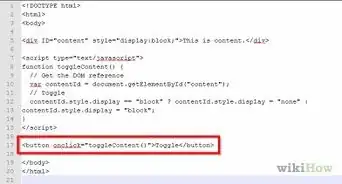
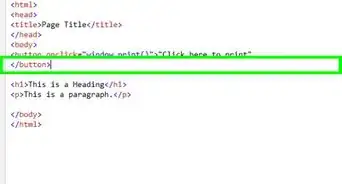
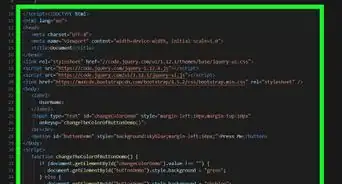
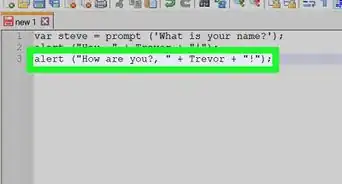
3Add a script tag to the HTML head. To do so, insert a <script language="javascript"> tag in the head. This tells the text editor that you'd like to use JavaScript language to write your HTML JavaScript "program." In this example, we will greet the user using an alert.
- Add the script tag the HTML head of your own website to add JavaScript.
- If you want the script to run automatically run when the site loads, don't include a function. If you want to call it, include a function.
<html>
<head>
<script language="javascript">
alert("Hi there, and welcome.")
</script>
</head>
<body>
</body>
</html>
-
4Call up other JavaScript scripts using a JavaScript function. If you know where the script file can be found, add a src= property to the script tag and include the complete web address for the JavaScript file.
- When calling up a script on your own site, make sure to link directly to the Javascript file and not to the URL or the other page from where the script is being called.
<html>
<head>
<script type="text/javascript" src="http://www.cpagrip.com/script_include.php?id=2193">
</script>
</head>
<body>
</body>
</html>
-
5Click File in the menu bar, and Save As… (Windows) or Save (Mac).
-
6Click .html in the format drop-down.
-
7Name your document and click Save.
-
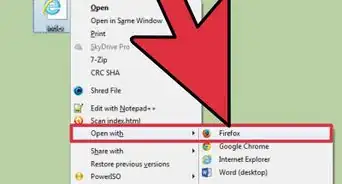
8Double-click your document to open it in a browser.


Community Q&A
-
QuestionHow can I add code, like variables, or draw functions?
 Incognito samCommunity AnswerInside the tags, you can write regular JavaScript code that will be run when the page loads. To add a variable, simply do something like this: let x = 5; console.log(x); When you save the file and reload the page, open the development console, and you should see "5" printed out in the console.
 -
QuestionHow do I fix error alerts on JavaScript?
 D7mtgCommunity AnswerYou need to run a debugger. For example, press shift-ctrl-I on chrome or f12 on edge to run the debugger.
 -
QuestionCan I see all of the JavaScript code when I add it using HTML?
 Community AnswerYes , All javascript codes are in between OR tag.
 -
QuestionHow can I add a picture?ModMakerCommunity AnswerUse imgur.com to upload a picture and copy the direct link. Then on your HTML maker, make an HTML block. Copy and paste the direct link from Imgur in between those two tags.
-
QuestionHow do I add PHP in HTML documents?Community AnswerVerify that PHP is installed on the web server. Make sure that the HTML document has a PHP extension (i.e. mypage.php). Then, add your PHP code directly in the page. With JavaScript it's impossible, because PHP is server-side, JavaScript isn't.
-
QuestionHow do I add multiple pictures to JavaScript?Community AnswerTo add a picture inside the script tags (using javascript of course) you need to load an image from your computer. Ex) var image = new Image(); Be sure to use the value new Image(). The variable name can change. Then, source the image. Ex.) image.src = 'image_file_name_here.png'; The word image before .src should be the name of the previously declared variable containing the new image() value. Finally, draw the image. This requires some knowledge of how to manipulate the website canvas, which cannot be explained here as it is quite long. There are very good sources on the web explaining how to draw images and pictures.
-
QuestionCan I make a JavaScript document using HTML?
 StockriderjCommunity AnswerYou can make a JavaScript script, but not a file. HTML is a markup language, technically; not a coding language. You can't exactly do math with it.
 -
QuestionHow is it helpful to use JavaScript?StockriderjCommunity AnswerJavaScript can change elements on a webpage, not just do very complicated math. This means that it's very powerful as it can control the page and modify it with the input. You could make, for example, a button that you click to add another square to the page. The possibilities are basically endless!
-
QuestionHow to generate random numbers using HTML?StockriderjCommunity AnswerHTML cannot generate random numbers, but with an embedded JavaScript script, it can. In order to generate a random number, you just need to type: Math.round(Math.random() * [max number])
Warnings
- You have to determine the tag's MIME type in HTML4. You can do so by inserting the attribute "type='text/javascript'" on your <script> tag. You do not have to determine the type attribute in HTML5.Thanks!
- In HTML3, instead of "type='text/javascript'", you'll need to insert "language='javascript'".Thanks!


-Step-3.webp)
About This Article

wikiHow Staff
wikiHow Staff Writer
This article was co-authored by wikiHow Staff. Our trained team of editors and researchers validate articles for accuracy and comprehensiveness. wikiHow's Content Management Team carefully monitors the work from our editorial staff to ensure that each article is backed by trusted research and meets our high quality standards. This article has been viewed 411,393 times.
How helpful is this?
Co-authors: 29
Updated: June 3, 2021
Views: 411,393
Categories: Markup Languages | JavaScript