This article was co-authored by wikiHow Staff. Our trained team of editors and researchers validate articles for accuracy and comprehensiveness. wikiHow's Content Management Team carefully monitors the work from our editorial staff to ensure that each article is backed by trusted research and meets our high quality standards.
There are 7 references cited in this article, which can be found at the bottom of the page.
This article has been viewed 1,267,183 times.
Learn more...
A status report might seem like a chore, but it can be a great opportunity to communicate about a project with management. In order to keep everyone in the loop, it’s really important to make sure you present everything clearly. Put the most important information in a summary at the start of the report. Provide specific details about the project's budget and timeline, then describe accomplishments and challenges. Keep your writing clear and concise. Your manager will appreciate an organized report that is brief, but informative.
Steps
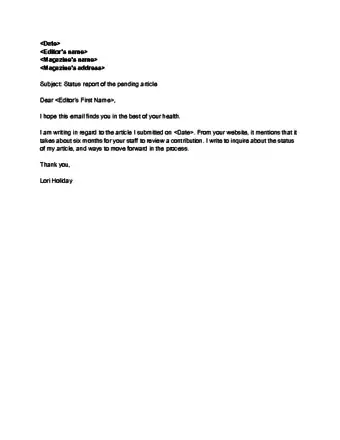
Status Report Example

Method 1
Method 1 of 15:Gather budget and scheduling information.
-
1The budget and schedule are the most important parts of most projects. Your manager wants to know that the project will be completed on time, and ideally under budget.[1]
- The overall information for the project will likely be broad. Find out what smaller things must be done to achieve the ultimate goal. For example, if your goal is to produce 1,000 T-shirts and your budget is $500, you need to know what materials are needed to produce the shirts and whether they are already on hand or must be ordered.

Method 2
Method 2 of 15:Break down large goals into smaller ones.
-
1Splitting up larger goals allows you to better evaluate your progress. Start with specific deadlines that have already been set, then try to build in time where you can to accommodate challenges.[2]
- For example, if your goal is to produce 1,000 T-shirts in 4 months, you can break that goal down into smaller goals of 250 T-shirts each month. If the team produced 300 T-shirts in the first month, you could report that you were ahead of schedule.

Method 3
Method 3 of 15:List major accomplishments.
-
1Put accomplishments at the top, focusing on milestones. The purpose of a status report is to let your manager know quickly what is working and what isn't. Include as many specific details as possible.[3]
- If you're working on a team, talk to other team members about what's going well with the project. Include as many names in your report as possible.
- Use specific numbers where you can, as opposed to generalities.

Method 4
Method 4 of 15:Brainstorm fixes for problems.
-
1If you recognize issues with the project, don't try to hide them. Instead, be up front with your manager about the issues and suggest solutions. Try to come up with several options so they can choose the one they like best.[4]
- For example, if your project is ahead of schedule but behind on budget, you might suggest speeding up production, adding another employee to the project, or boosting the budget.

Method 5
Method 5 of 15:Identify key milestones and projections.
-
1Using the current status of the project, predict when you’ll reach the next milestone. Through the lifetime of the project, smaller goals represent milestones that must be achieved by a certain point to keep the project on track. [5]
- For example, suppose you produced 250 shirts in 28 days. You might predict that the next 250 shirts will be completed in 28 days from the date of the status report.

Method 6
Method 6 of 15:Add any notes that are important to the project.
-
1Recognize people who have contributed a lot to your project. Include a human element to your status report with information about team members whose work has been outstanding, or changes made that affected performance.[6]
- For example, you might write "The project is ahead of schedule, in large part, thanks to the diligent efforts of Sally Sunshine. Sally worked overtime 3 days last week."

Method 7
Method 7 of 15:Ask if there's a template you should use.
-
1Many companies have a standard template that they use for all status reports. If your company has one, using it can help you keep your report organized and ensure all the necessary information is included.[7]
- If there's not a specific template, there may be one you can use in your word processing app. You can also find sample templates online by searching for "status report template." Make sure any template you download will actually work for your project. You may want to let a supervisor look at it first.

Method 8
Method 8 of 15:Start with a clear heading.
-
1Check if your company has a specific format for status report titles.The title or heading of your report should state the name of the project or work you're reporting on, and the dates the report covers. If you'll be responsible for several reports, they should all be titled in the same format.
- For example, your heading might be "August 2018 Parker Shipment Status." A report for the next month would be "September 2018 Parker Shipment Status."

Method 9
Method 9 of 15:Write an executive summary on the first page.
-
1Managers are busy and may not have time to read your entire report. The executive summary provides the most important information up front so your manager knows the status of your project at a glance.[8]
- For example, the executive summary for "August 2018 Parker Shipment Status" might be: "The Parker Shipment is ahead of schedule. However, we've used 50% of our budget with only 30% of the total shipment produced. Speeding up production may help decrease costs."

Method 10
Method 10 of 15:Organize your report in sections.
-
1Long blocks of text can take too long to scan, and are cumbersome to read. Use short paragraphs and bullet-point lists where possible, so your report is easier for your manager to digest.[9]
- For example, you might have one section for accomplishments, another for challenges, and a third for solutions.

Method 11
Method 11 of 15:Start your report early to give yourself more time.
-
1Find out when status reports are due and carve time each day to work it. That way you won't be rushing to try to do it at the last minute.[10]
- If you're working on an ongoing project, you can create a "template" for your status reports that you'll use each time. This will be much easier for your manager, because they'll know exactly where to find the information they need in each report.
- If you need to update figures included in the report before you turn it in, leave yourself reminders to do so.

Method 12
Method 12 of 15:Tailor your report to your manager's style.
-
1Organize your report so that the important things your are front and center. If you're unsure about your manager's style and preferences, ask to see examples of previous status reports that they liked.[11]
- For example, if you know your manager likes to read a chronological story, you might start with a section headed "This Week's Progress," followed by another labeled "What's Next."

Method 13
Method 13 of 15:Optimize your report based on the method of delivery.
-
1Consider how your status report will be read. If you're submitting a digital file of your report, you can include links to websites or even GIFs and videos, if appropriate. However, if you're submitting a hard copy, these elements won't be useful.[12]
- For example, if you're sending a digital file using email, you might want to make sure any visual elements can be viewed on a mobile device.

Method 14
Method 14 of 15:
Proofread and edit your report.
-
1Keep your sentences short, and eliminate unnecessary words and repetition. Don't just rely on the spelling and grammar checkers in your word processing app. Read through and check the report yourself.[13]
- Your writing should be concise and direct. Avoid using a lot of jargon, which can make it seem like you're trying to hide something or don't know what you're talking about.
- Read your report aloud. If you stumble over a sentence, that's a clue that your writing is not as clear as it could be.

Method 15
Method 15 of 15:Create visual elements, if desired.
-
1Some managers prefer visual cues as to how a project is doing. That way, they can more quickly assess the project's status. Only include visual elements if you were specifically asked to do so, or if you think they would add something to the report.[14]
- For example, you might put a green traffic light next to the budget, to indicate that costs were being managed well. If you're a little behind schedule, you would put a yellow light next to the scheduling section.

Community Q&A
-
QuestionHow do I write a status report for a construction project?
 Community AnswerIt's like a progress report on what you have achieved in the project so far and the pending issues you foresee in the future. After you have written these things, mention whether you are ahead of or behind schedule and when you estimate the project will be finished.
 -
QuestionHow do I write a job report?
 Community AnswerYou can search on Google for a job report template. It will depend on what type of job you are reporting on.
 -
QuestionHow do I write a summary report?Community AnswerStart with an intro, then a first body paragraph, any others you need and then do a closing paragraph. Follow the steps in this article.
-
QuestionHow do I write a technical status mail?Community AnswerAssuming a technical status mail is an email giving the current status of a technical project, it should answer the following: Is it on schedule? What phase is it in? When will the current phase be done? What's the expected completion date, compared to the current schedule? Does it have the resources (usually people and hardware) that it needs to complete on time or avoid falling further behind? If not, what resources are needed? Without them, what will the effect be on the completion date?
-
QuestionWhat should a status report include?
 Drew Hawkins1Community AnswerA status report should always be as direct and to the point as possible. That means, it should contain only relevant and necessary information. List all of the large items that the report covers and break them down into the smaller items that goes into getting them done. Then, list all of the major accomplishments, followed by any failures or problems that have occurred with any of the projects or assignments. After the problems, add some potential fixes or solutions that you've come up with so you can discuss the best options moving forward. Wrap it up by looking ahead to any future goals and projects that you're working to accomplish.
 -
QuestionWhat is the main purpose of a status report?Drew Hawkins1Community AnswerA status report should do exactly what its name alludes to: update people about the status of a project or task so they can clearly and easily assess where it stands. To that end, a good status report should only contain useful and relevant information such as the tasks completed, as well as any problems or issues. It should also have a few potential solutions for problems so there can be a discussion about the best way to resolve them. The status report should essentially update people about work in progress as well as outline the strategies for upcoming projects.
-
QuestionWhat is a monthly status report?Drew Hawkins1Community AnswerA monthly status report is a document used to update people on the progress of the previous month on a specific goal or project. It should include any work that was completed, as well as any work that faced problems or was behind schedule. It could also include potential solutions for problems so stakeholders, managers, or whoever the report is intended for can discuss the best possible solution going forward. Additionally, monthly status reports can include projections and tasks that will be focused on in the following month.












References
- ↑ http://4pm.com/2016/02/16/how-to-write-a-weekly-status-report/
- ↑ http://4pm.com/2016/02/16/how-to-write-a-weekly-status-report/
- ↑ https://www.projectsmart.co.uk/how-to-report-status-on-a-project.php
- ↑ http://4pm.com/2016/02/16/how-to-write-a-weekly-status-report/
- ↑ https://www.projectsmart.co.uk/how-to-report-status-on-a-project.php
- ↑ http://eleganthack.com/the-dreaded-weekly-status-email/
- ↑ https://www.innovation.ca/sites/default/files/essential_documents/ppr-template-en-apr2016.pdf
- ↑ https://business.tutsplus.com/tutorials/how-to-write-better-status-reports--cms-23479
- ↑ https://www.projectsmart.co.uk/how-to-report-status-on-a-project.php
- ↑ http://www.dummies.com/careers/project-management/how-to-write-an-interesting-progress-report-for-projects/
- ↑ http://4pm.com/2016/02/16/how-to-write-a-weekly-status-report/
- ↑ https://thedigitalprojectmanager.com/project-status-report-guide/
- ↑ https://www.projectsmart.co.uk/how-to-report-status-on-a-project.php
- ↑ https://www.projectsmart.co.uk/how-to-report-status-on-a-project.php
About This Article

To write a status report, write a clear heading that includes the name of the project and the dates the report covers. Open the report with an executive summary to provide the most important information at a glance. Then, break the rest of the report into sections to allow for easier reading. Make sure to include budget, scheduling information, a list of major accomplishments, and potential fixes for problems. Finally, consider using a visual element for quick access to information, such as a green light next to a schedule that's on time. For more tips on creating executive summaries, read on!