This article was co-authored by Mobile Kangaroo. Mobile Kangaroo is a full service repair shop and Apple Authorized Service Provider headquartered in Mountain View, CA. Mobile Kangaroo has been repairing electronic devices such as computers, phones, and tablets, for over 16 years, with locations in over 20 cities.
There are 9 references cited in this article, which can be found at the bottom of the page.
This article has been viewed 1,816 times.
It's annoying to keep getting a "No SIM" error message on your phone, especially when you know you've got one inserted! It might even be preventing you from receiving texts. But what is the SIM and why is yours acting up? SIM stands for subscriber identification module (SIM)—this circuit chip's job is to authenticate your identity and store information so you can seamlessly transfer data.[1] If you're getting the error message, check out these possible causes and troubleshooting options to fix your phone.
Steps
Method 1
Method 1 of 12:The SIM isn't inserted properly.
-
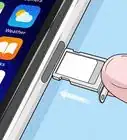
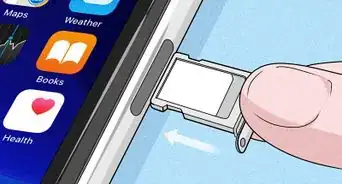
1Remove the SIM and reinstall it. Sometimes, the SIM is loose or not pushed in all the way which can trigger an error code. All you need to do is eject the SIM card tray, which is on the side of the phone, and take the SIM out.[2] Wait for around 30 seconds and put the SIM back into the tray. Push it back in and restart your phone.[3]
- If you've got an Android phone, your SIM card might be located near the battery on the back. You may have to open a tiny metal door that covers the SIM in order to take it out.
- You may need to push the end of a paperclip or a tiny metal SIM key tool onto a button that's on the side of the SIM card tray.
Advertisement

Method 2
Method 2 of 12:Your SIM is dirty.
-
1Wipe the surface with a clean cloth if it looks grimy. If dirt builds up on the SIM, it can make it hard for your phone to read the information. This can trigger the error message. Fortunately, if you remove the SIM and gently clean the surface, you might fix this problem.[4]
- Avoid touching the surface of the SIM so you don't leave oil or accidentally scratch it.
- Never clean the SIM with water, soap, or rubbing alcohol since these can damage the delicate surface.

Method 3
Method 3 of 12:The SIM slot is dirty or clogged.
-
1Remove the sim and pull out the SIM tray. Some phones come with a small tool you can use to carefully pull the tray out. If not, you can unfold a paper clip and use it to gently pull out the tray. Then, insert the straw of a compressed air can into the empty slot and spray a few times to blow out the debris.[5]
- You can reinsert the slot and SIM card to see if this fixed the problem.
Advertisement

Method 4
Method 4 of 12:The SIM is worn out or damaged.
-
1Replace the SIM if it's scratched or the edges are fraying. A SIM card is a piece of hardware that will eventually wear out, especially if you frequently take it out and put it back in. Buy a new SIM card from your carrier, technology stores, or online, and see if your phone recognizes it—all you have to do is remove the old one and pop your new SIM in place.
- In general, a new SIM card costs up to $20, but it depends on storage capacity and whether or not a carrier requires a plan. Keep in mind that you will get a new phone number when you buy a new SIM card.
- Try not to handle the SIM card unless it's absolutely necessary. This way, you won't wear it out as quickly.

Method 5
Method 5 of 12:You need to do a soft restart.
-
1Turn the phone off and back on to fix minor SIM glitches. Although it seems too simple, sometimes your phone needs a soft restart which clears temporary data and stops apps that are running. When you turn your phone back on, it can then recognize your SIM.[6]
- If you have to do this frequently because you continue to see the error message, there may hardware problems with your phone, or the SIM card might be worn out and need to be replaced.
Advertisement

Method 6
Method 6 of 12:You're not connected to your carrier's network.
-
1Go into "Connections" in the settings menu and click "Mobile networks." From there, you can search the available networks. Your phone might be sending the SIM error message if you aren't connected to your network. Your network should be the same as your SIM card. [7]
- Not sure which network your SIM card works with? Look at the SIM card—it has the network logo printed directly on it.
- Your phone might connect to the wrong network if you have it set to automatically connect to a network. Disable this feature so you can manually select your carrier's network.

Method 7
Method 7 of 12:You need to reset the network settings.
-
1Clear the network settings so your phone recognizes the SIM card. Sometimes, a problem with the network connection triggers a SIM error message. To do a network reset, go into "Settings," and select, "Network settings." Then, press "Reset network settings" and let your phone reset.[8]
- Keep in mind that resetting the network settings will also reset your Wi-Fi settings. Have your password handy so you can enter it when your phone starts up again.
Advertisement

Method 8
Method 8 of 12:You need to update your operating system.
-
1If your phone's running an old system, it may not recognize the SIM. If you have an Android or Apple product, you can manually update your phone by searching for a "System update" under the settings menu. Your phone will tell you if there's an update available. If there is, select "Download and Install." Then, restart your phone after it's updated the operating system.[9]
- You can also select "Automatic updates" in your settings menu so your phone updates whenever the operating system is upgraded.

Method 9
Method 9 of 12:There's an app that's malfunctioning.
-
1Restart your phone in safe mode if an app is causing the problem. Some Android and Apple phones have a safe mode feature that can help you diagnose problems with apps. If your phone has it, you'll see the option when you hold down the power button. A power menu that says "Safe mode" will pop up. Selecting this might be enough to fix the issue. If your phone still doesn't recognize the SIM, uninstall your recently downloaded apps until you identify which one caused the problem.[10]
- If your phone runs perfectly well in safe mode with no error message, an app might be triggering the error code. Try uninstalling the newest apps you've put on your phone along with the ones you never use.
- Once you've removed the app that caused the error message, you can reinstall the other apps that you uninstalled.
Advertisement

Method 10
Method 10 of 12:You need to clear your phone's data cache.
-
1This removes the error notification from your phone. Your phone might be operating perfectly well but the SIM error message won't go away. To fix this, just go into "Internal storage" from the settings menu. Select the "Cached data" option and hit "Delete."[11]

Method 11
Method 11 of 12:Perform a factory reset if troubleshooting doesn't work.
-
1Factory reset erases all of the data on your phone. It is an extreme troubleshooting option, but that's why you should only try it when nothing else is working. When you do a factory reset and turn your phone back on, it should operate just like it did when you first got it—no apps, contacts, or media files on it.[12]
- Back up any files you want to keep to a flash drive or the cloud before you do a factory reset. This way you won't lose valuable data.
Advertisement

Method 12
Method 12 of 12:Your phone has a hardware problem.
-
1The issue might be with your phone if you've troubleshot the SIM. If you've tried everything, but still get an error message or your phone isn't running as smoothly as you'd like, it's probably time to take it into a cell phone repair shop or your service provider. They can diagnose and solve problems with your phone.
- If your phone is old, the hardware might be wearing out which can cause the SIM error messages. Replacing the phone and transferring the SIM card might be the best solution for you.





References
- ↑ Mobile Kangaroo. Computer & Phone Repair Specialists. Expert Interview. 11 September 2019.
- ↑ Mobile Kangaroo. Computer & Phone Repair Specialists. Expert Interview. 11 September 2019.
- ↑ https://support.apple.com/en-us/HT201337
- ↑ https://www.manualsdir.com/manuals/75207/doro-phoneeasy-338gsm.html?page=26
- ↑ https://updato.com/how-to/phone-says-no-sim-card-android-issue-here-are-7-ways-to-fix-it/
- ↑ https://support.apple.com/kb/index?q=phone+says+there%27s+no+SIM&src=globalnav_support&locale=en_US&type=organic&page=search
- ↑ https://cellularnews.com/cellular-network/how-to-fix-invalid-sim-card/
- ↑ https://cellularnews.com/cellular-network/how-to-fix-invalid-sim-card/
- ↑ https://www.techsolutions.support.com/how-to/how-to-fix-no-sim-card-installed-error-for-iphone-11111
About This Article