X
wikiHow is a “wiki,” similar to Wikipedia, which means that many of our articles are co-written by multiple authors. To create this article, volunteer authors worked to edit and improve it over time.
This article has been viewed 31,826 times.
Learn more...
Do you want to find a word meaning quickly in your Chrome browser? Google Dictionary will help you! This extension will support 15+ languages like English, Arabic, Chinese, French, German, Italian. Google Dictionary is free and easy to use!
Steps
Method 1
Method 1 of 3:Install Google Dictionary Extension
Method 1
-
1Go to Chrome store. Go to chrome.google.com/webstore in your browser
-
2Search for Google Dictionary. Navigate to the search box at the top-left side of the page and type "Google Dictionary" also hit the enter button.
- Go to chrome.google.com/webstore/detail/google-dictionary-by-goog/mgijmajocgfcbeboacabfgobmjgjcoja to directly access the Google Dictionary's download page.
-
3Install the extension. Click on the ADD TO CHROME button near the Google Dictionary (by Google) text.
-
4Done. Now you can see a "red book" icon on the top bar.


Method 2
Method 2 of 3:Personalize Settings
Method 2
-
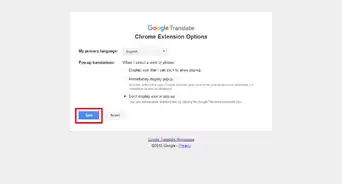
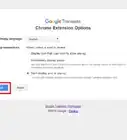
1Open the Google Dictionary Extension option. Right-click on the extension's icon at the top bar and select Options from the list.
-
2Choose your language. Click on the box near the My language and select your language from the list.
-
3Change Pop-up definitions display mode. Check each box to active. You can choose:
- Display pop-up when I double-click a word.
- Display pop-up when I select a word or phrase.
-
4Enable Word history. Store a history of words that you have searched, so so you can practice them later. Just check the checkbox near the Store words I look up, including definitions text.
-
5Save your changes. Hit the Save button at the bottom.


Method 3
Method 3 of 3:Use the Extension
Method 3


Community Q&A
-
QuestionWhen I highlight a word, a new tab with Merriam-Webster Dictionary also opens; can I stop that?
 Community AnswerGo to your application manager and temporarily disable the dictionary. Then do the import, and finally re-enable the MW Dict.
 -
QuestionHow do you view the saved words history?
 DANIEL FOXCommunity AnswerWhen you make a spelling mistake, use spell check with Ctrl+Alt+X. And then next to it, there should be something that looks like three dots stacked. Then click on that and click personal dictionary and it shows saved words.
 -
QuestionHow about phone? How can I install the Google dictionary? Is it the same?Community AnswerNo, that isn't possible. Extensions aren't available on mobile. You need a computer for extensions.
Warnings
- You can't use this extension in offline mode.Thanks!