X
This article was written by Jack Lloyd. Jack Lloyd is a Technology Writer and Editor for wikiHow. He has over two years of experience writing and editing technology-related articles. He is technology enthusiast and an English teacher.
This article has been viewed 616,864 times.
This wikiHow teaches you how to display a hidden column in Microsoft Excel. You can do this on both Windows and Mac versions of Excel.
Steps
-
1Open your Excel document. Double-click the Excel document, or double-click the Excel icon and then select the document's name from the home page. This will open your document that has hidden columns in Excel.
-
2Select the columns on both sides of the hidden column. Hold down the ⇧ Shift key while you click the letter above the column to the left and then the column to the right of the hidden column. The columns will be highlighted when you successfully select them.
- For example, if column B is hidden, you should click A and then C while holding down ⇧ Shift.
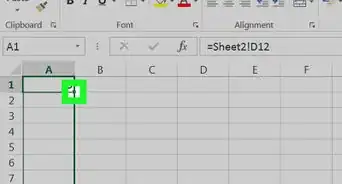
- If you want to unhide column A, select the column by typing "A1" into the "Name Box," which is located to the left of the formula bar.
-
3Click the Home tab. It's in the upper-left side of the Excel window, at the bottom of the green ribbon here. Doing so will ensure that the Home toolbar is displayed below the green ribbon.
-
4Click Format. This button is in the "Cells" section of the Home tab; you'll find this section on the far-right side of the toolbar. A drop-down menu will appear.[1]
-
5Select Hide & Unhide. This option is below the "Visibility" heading in the Format drop-down menu. Selecting it will prompt a pop-out menu.
-
6Click Unhide Columns. It's near the bottom of the Hide & Unhide menu. Doing so will immediately unhide the column that's between the two selected columns.


Community Q&A
-
QuestionWhat do I do if the hidden columns are A and B?
 Community AnswerYou can select the whole document and do the steps above to retrieve all hidden columns.
 -
QuestionWhat do I do if I've followed the instructions provided, but I still cannot unhide column A in Excel?
 Community AnswerTry unfreezing the column and unhiding, or freezing then unfreezing then unhiding. This process will work.
 -
QuestionIf column A is hidden in excel, how do I find it?Community AnswerJust use the search bar on top and type there "A1" the hidden column should appear.
-
QuestionHow can I unhide columns A and B?
 Community AnswerIf C is visible, type "A:C" in the name box (left of the formula bar). A, B and C are now selected. Right-click the (visible) C column and select Unhide.




References
About This Article
Article SummaryX
1. Open your Excel document.
2. Select the columns on both sides of the hidden column.
3. Click Home
4. Click Format
5. Select Hide & Unhide
6. Click Unhide Columns
Did this summary help you?